
5.3 Remediation: from threats to verified fixes
In this lesson you will:
- Choose between mitigating, eliminating, transferring and accepting a risk, and justify the choice.
- Select controls using defence in depth and a balance of prevention, detection and response.
- Turn decisions into tracked work with owners, due dates and service levels.
- Manage formal risk acceptance with a named approver, compensating controls and an expiry date.
- Verify that mitigations work, and close the loop back into the threat model.
Opening case: the fix that wasn't
Kestrel's threat model for the instant-refund feature recorded T-R4: "A merchant user can refund more than the original payment." The ticket was closed as "fixed" before launch: the refund form now showed an error if the amount entered exceeded the payment.
Two months later, a merchant's staff member, colluding with a friend, refunded ₹18,000 against a ₹1,800 payment. The check was in the browser. Calling the API directly skipped it.
The threat had been identified, a fix had been built, and the ticket was closed. What was missing was verification. By the end of this section you will be able to run remediation so that "closed" means "proven to work".
Question 3: choosing a response
For every threat rated red or amber, the team decides one of four responses (Figure 5.4). These are the same four risk treatment options used in enterprise risk management, applied to a single design.
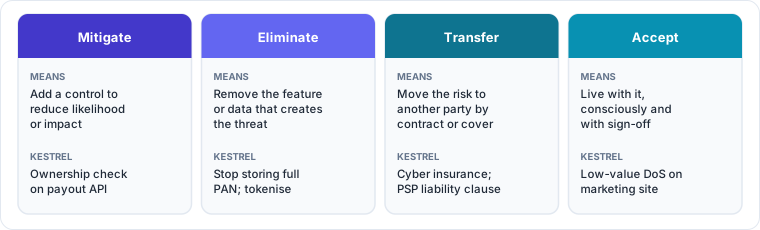
Mitigate. Add or strengthen controls to reduce likelihood or impact. This is the most common response. Example: add a server-side ownership check to the payout endpoint.
Eliminate (avoid). Remove the feature, data or capability that creates the threat. This is often the most effective and most overlooked response. Examples: stop storing full card numbers by using tokenisation; do not give the Disputes agent a free-form send_mail tool at all; retire the settlement-file path once all banks are on the API.
Transfer (share). Move some of the risk to another party through contract or insurance. Examples: a payment gateway handles card data so its PCI scope is theirs; cyber insurance covers some incident costs; a vendor contract makes the vendor liable for labelling fraud. Transfer rarely removes the risk completely. Customers and regulators will still hold Kestrel responsible, and reputational harm cannot be transferred.
Accept. Live with the risk, consciously, with a named person's approval. Acceptance is legitimate when the cost of mitigation outweighs the risk, or when a fix must wait. It is not legitimate when it is silent, indefinite or made by someone without the authority to accept that level of risk.
Practitioner tip. Always ask "can we eliminate this?" before "how do we mitigate this?". Removing a capability you do not need is cheaper than defending it forever, and for AI agents, least agency is elimination applied to tools and permissions.
Selecting controls
Prevent, detect, respond
Controls fall into three families:
- Preventive controls stop the threat succeeding: authorisation checks, input validation, MFA, encryption, least privilege.
- Detective controls notice when it is attempted or succeeds: logging, alerts on unusual patterns, integrity monitoring, anomaly detection on agent actions.
- Responsive (corrective) controls limit and recover from damage: holding first settlements to new accounts, the ability to reverse refunds, a kill switch for an agent, backups and rollback of a model.
Good designs combine them. Prevention alone fails silently when it is bypassed; detection alone lets damage happen first. For T-R4, the right set was: server-side validation (prevent), an alert on refunds above 100% of the original amount from any path (detect), and a hold on refunds above a threshold pending review (respond).
Defence in depth
Do not rely on one control for a high-impact threat. Layer independent controls so that the failure of one does not mean the failure of all. For the Kira data-exfiltration chain in Section 4.3, the layers were: curated corpus (ingestion), permission-aware retrieval, isolation of untrusted content in the prompt, restricted Markdown rendering, and a content security policy in the browser. An attacker has to beat all of them.
Where to enforce
A recurring lesson from every example in this course: enforce on the server, in code you control, at the point where the action happens. Browser checks, UI hiding, prompt instructions and model behaviour are helpful for usability and as additional layers, but they are not security boundaries. The refund bug in the opening case is the same mistake as relying on a system prompt to stop an agent misusing a tool.
Prefer standard, proven controls
Use well-tested platform features and libraries (your framework's authorisation middleware, your cloud provider's key management, an established OAuth library) rather than custom implementations. Each custom security control is a new thing to threat model.
Turning decisions into tracked work
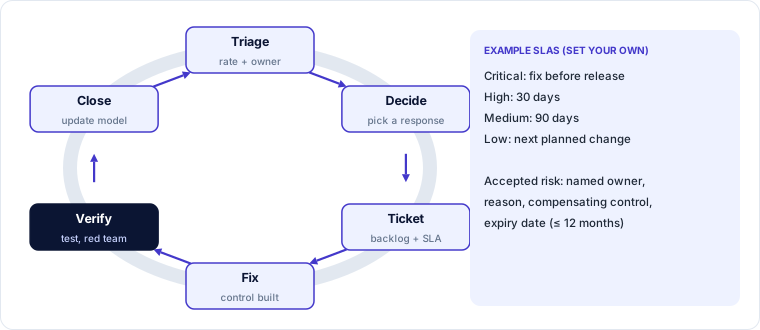
Ticket every mitigation. Each red or amber threat with a "mitigate" or "eliminate" response becomes one or more backlog items, carrying the threat ID, the threat statement, the agreed control, acceptance criteria and the test that will prove it.
Name an owner and a due date. An owner is a person, not a team. The due date follows the organisation's remediation service levels (SLAs). Figure 5.5 shows an example; set your own according to risk appetite and regulation:
| Rating | Example SLA |
|---|---|
| Critical (red, high impact on money or regulated data) | Fix before release, or treat as an incident if already live |
| High | 30 days |
| Medium | 90 days |
| Low | Next planned change to the component |
Prioritise with the product owner. Security work competes with features. The rating, the business-language impact statement and a rough effort estimate (Section 5.2) give the product owner what they need to schedule it.
Track to closure. Keep the threat register's status column current: open, in progress, mitigated (pending verification), verified, accepted. Report items past their SLA.
Formal risk acceptance
When a threat will not be fully mitigated, record a risk acceptance containing:
- The threat ID and statement, and the current rating.
- The reason (for example, "mitigation requires the bank's API v3, available in Q2").
- Compensating controls that reduce the risk in the meantime (for example, daily manual reconciliation of settlement files).
- The residual rating with those controls.
- The approver, who must have authority for that level of risk under the organisation's risk policy (a team lead may accept a low risk; a high risk may need a business head or the CISO).
- An expiry date, after which the acceptance must be reviewed (often no more than 12 months, shorter for high risks).
Acceptances without expiry dates become permanent by default. Review them in the same forum that reviews overdue remediation.
Verifying mitigations
The opening case failed here. A ticket closed by a developer is evidence that work was done, not that the threat is mitigated. Verification answers the fourth question, "Did we do a good enough job?", for each mitigation.
Test the threat, not the feature. The test for T-R4 is not "the form shows an error". It is "a direct API call to refund more than the original payment is rejected, and no money moves". Write tests from the attacker's side.
Automate where possible. Security regression tests in the pipeline (authorisation tests, rate-limit tests, prompt-injection test sets for AI components) catch the fix being undone later.
Use independent testing for high risks. Penetration tests and, for AI systems, red-team exercises should be briefed with the threat model and asked specifically to try to bypass the mitigations for red threats.
Verify detective and responsive controls too. Trigger the alert in staging and confirm someone receives it. Run the kill switch in a drill. A detective control nobody watches is not a control.
Mark the threat "verified" only with evidence: the test name and result, the pen-test reference, or the drill record.
Closing the loop
Remediation feeds back into the model:
- Update the threat model with the controls now in place and the new residual ratings.
- Check for new threats introduced by the fix. A new approval workflow is a new process with its own threats; a new logging pipeline is a new data store containing sensitive data.
- Learn from misses. When an incident or pen test finds something the model did not anticipate, run a short retrospective: was it out of scope, was an assumption wrong, was a category skipped, or was the diagram incomplete? Fix the method, not just the bug.
- Re-threat-model on triggers (Section 3.1), so the model stays true as the system changes.
The opening case, resolved
After the over-refund incident, Kestrel changed three things. First, the definition of "mitigated" now requires a linked test that exercises the threat from the attacker's side. The test for T-R4 calls the refund API directly with an amount above the remaining refundable balance and expects rejection. Second, threat register entries cannot move to "verified" without that evidence. Third, the team added a detective control (an alert on any refund above the original payment) and a responsive one (refunds above ₹10,000 are held for 30 minutes and can be cancelled). A retrospective found the root cause in the method: the original ticket's acceptance criterion described the UI, not the threat. The ticket template now starts with the threat statement.
Check your understanding
1. A threat in the Disputes agent design is "the agent can email case data to any address an attacker supplies". Which response is best, and why?
Answer: Eliminate: replace the free-form send_mail tool with one that can only reply to verified case contacts. Removing the capability is simpler and stronger than trying to detect or filter malicious addresses.
2. What must a risk acceptance include to be valid?
Answer: The threat and current rating, the reason, compensating controls, the residual rating, an approver with authority for that level of risk, and an expiry date.
3. A developer closes a ticket for "rate-limit the payment-link API" after adding a limit in the mobile app. Is the threat mitigated?
Answer: No. Client-side limits are bypassed by calling the API directly. The limit must be enforced on the server (or gateway), and verified by a test that sends requests directly above the limit and expects them to be rejected.
Key takeaways
- Choose a response for each significant threat: mitigate, eliminate, transfer or accept. Ask "can we eliminate it?" first.
- Combine preventive, detective and responsive controls in depth; enforce on the server, not in the UI or the prompt.
- Ticket every mitigation with the threat ID, an owner, a due date by SLA, acceptance criteria and a test.
- Accept risk formally: reason, compensating controls, residual rating, authorised approver and expiry.
- Verify by testing the threat from the attacker's side; mark threats verified only with evidence; feed fixes, misses and changes back into the model.