
Privacy risk assessment and privacy by design
In this lesson you will:
- Explain privacy risk as risk to people, not only to the organisation
- Decide when a data protection impact assessment is required
- Run a DPIA from screening to sign-off
- Apply privacy-by-design principles and patterns to a new system
The cheapest time to fix a privacy problem is before the system is built. Risk assessments and privacy by design move privacy decisions to the design stage, where a changed requirement costs a meeting rather than a rebuild or a fine.
1. Privacy risk is risk to people
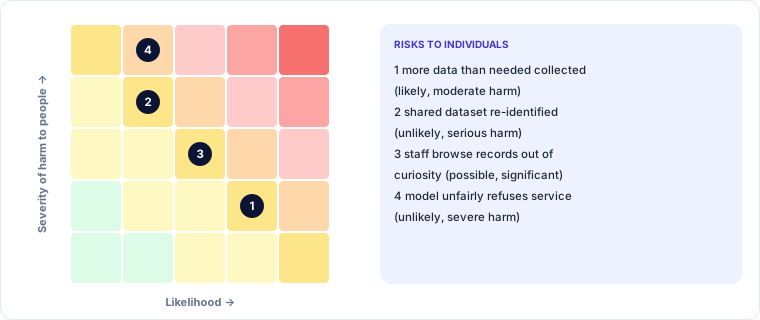
Security risk assessments usually ask what could happen to the organisation. Privacy risk assessments ask first what could happen to the people whose data is processed:
- loss of control over their information
- discrimination, exclusion or unfair decisions
- financial loss, fraud or identity theft
- physical harm, harassment or stalking
- distress, embarrassment or damage to reputation
- chilling effects: people avoiding services or self-censoring
Organisational consequences (fines, lawsuits, lost trust) follow from these harms. Rate each risk by likelihood and severity of harm to individuals, then identify measures that reduce it.
2. When is a DPIA required?
A data protection impact assessment (DPIA), also called a privacy impact assessment (PIA), is a structured assessment of a project's privacy risks. GDPR requires one before processing likely to result in a high risk to individuals. DPDP requires significant data fiduciaries to carry out periodic DPIAs and audits. Even where not required, DPIAs are good practice for anything new and sensitive.
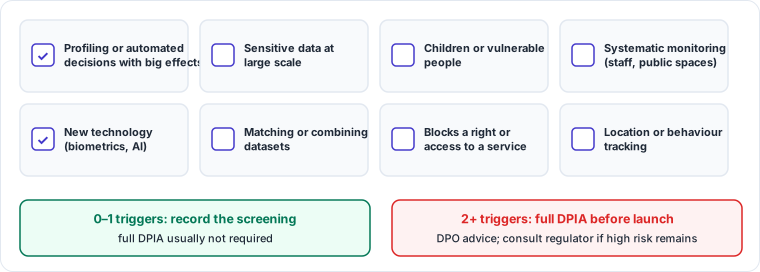
Common high-risk triggers (two or more usually mean "do a DPIA"):
- systematic and extensive profiling or automated decisions with significant effects
- large-scale processing of sensitive data or data about children or other vulnerable people
- systematic monitoring of public spaces or employees
- new technologies such as biometrics, facial recognition or AI
- matching or combining datasets from different sources
- processing that prevents people from exercising a right or using a service
- tracking location or behaviour
3. Running a DPIA
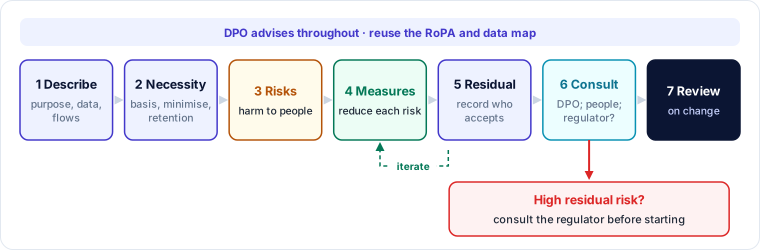
- Describe the processing: purposes, data, people, systems, vendors, flows, retention. Reuse the RoPA and data map.
- Assess necessity and proportionality: legal basis, minimisation, accuracy, retention, transparency, rights, transfers.
- Identify and assess risks to individuals: likelihood and severity.
- Identify measures to reduce each risk: technical, organisational, contractual.
- Evaluate residual risk and record decisions, including who accepted remaining risks.
- Consult: the DPO's advice must be sought; consult affected people or their representatives where appropriate; if high risk remains, consult the regulator before starting (GDPR prior consultation).
- Sign off, implement and review when the processing changes.
4. Privacy by design and by default
Privacy by design means building privacy into systems and processes from the start rather than adding it later. GDPR makes "data protection by design and by default" a legal duty. The idea comes from seven foundational principles:
- Proactive, not reactive: prevent problems before they occur.
- Privacy as the default: the most protective setting applies without the user doing anything.
- Privacy embedded into design: part of the architecture, not a bolt-on.
- Full functionality: positive-sum, not privacy versus usability.
- End-to-end security: across the full lifecycle, through to deletion.
- Visibility and transparency: open about practices, verifiable.
- Respect for the user: user-centric choices and controls.
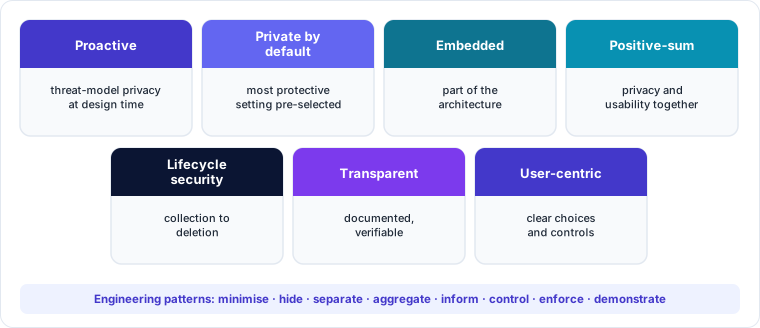
Privacy engineering turns these into patterns teams can apply: minimise (collect less), hide (encrypt, pseudonymise), separate (keep datasets apart), aggregate (use totals, not individuals), inform (just-in-time notices), control (user settings), enforce (policy as code) and demonstrate (logs, audits).
🔐 Privacy lens
Add privacy questions to the security threat model. Frameworks such as LINDDUN list privacy threats (linking, identifying, non-repudiation, detecting, data disclosure, unawareness, non-compliance) the way STRIDE lists security threats.
Worked example — DPIA for workplace monitoring software
A company wants software that records staff screens and keystrokes to measure productivity.
| DPIA step | Finding |
|---|---|
| Screening | Systematic monitoring of employees + new technology + power imbalance: full DPIA |
| Necessity | Stated aim (productivity insight) can be met with aggregated activity data, without screenshots or keystrokes |
| Risks | Capture of personal messages, passwords and health information; chilling effect; unfair performance decisions |
| Measures | No keystroke logging or screenshots; team-level dashboards only; no monitoring outside work hours; clear notice; consultation with staff representatives |
| Residual risk | Low to medium; accepted by the HR director with DPO advice recorded |
| Review | After six months, or if features change |
Key takeaways
- Privacy risk is assessed first as harm to individuals, then as consequences for the organisation.
- DPIAs are required for high-risk processing; common triggers include profiling, sensitive data at scale, children, monitoring and new technology.
- A DPIA describes, tests necessity, assesses risks, chooses measures, records residual risk, consults and is reviewed.
- Privacy by design and by default builds protection in from the start, using practical engineering patterns.
Self-check
- Give three harms to individuals a privacy risk assessment should consider.
- Name four triggers that suggest a DPIA is needed.
- What does "privacy by default" mean for a new app's settings?