
Data inventory, records of processing and data mapping
In this lesson you will:
- Explain why a data inventory underpins every other privacy control
- List what a record of processing activities contains
- Build a data-flow map for a business process
- Choose methods to discover and keep data inventories current
You cannot protect, explain, delete or hand back data you do not know you have. A reliable inventory is the foundation for notices, rights requests, risk assessments, retention, vendor control and breach response.
1. Three related artefacts
Data inventory: a catalogue of where personal data lives: systems, databases, files, SaaS tools, devices and vendors, with the categories of data in each.
Record of processing activities (RoPA): a register of each processing activity (purpose-level), such as "payroll" or "customer support", describing what is done, why and how. GDPR requires most controllers and processors to keep one; other laws expect equivalent documentation to show accountability.
Data-flow map: a diagram showing how personal data moves through a process: collection, systems, people, vendors, countries and deletion.
The inventory says where data is, the RoPA says why it is processed, and the map shows how it moves.
2. What a record of processing contains
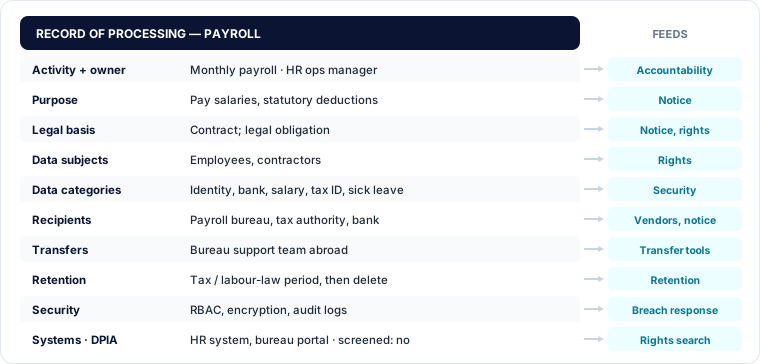
| Field | Example (payroll) | Feeds |
|---|---|---|
| Activity and owner | Monthly payroll; HR operations manager | Accountability |
| Purpose | Pay salaries, statutory deductions | Notice, purpose limitation |
| Legal basis | Contract; legal obligation (tax, social security) | Notice, rights |
| Data subjects | Employees, contractors | Rights handling |
| Data categories | Identity, bank details, salary, tax ID, sick leave | Classification, security |
| Recipients | Payroll bureau (processor), tax authority, bank | Vendor control, notice |
| Transfers | Payroll bureau's support team abroad | Transfer safeguards |
| Retention | Period required by tax and labour law, then delete | Retention schedule |
| Security measures | Role-based access, encryption, audit logs | Security, breach response |
| Systems | HR system, payroll bureau portal | Inventory, rights search |
| DPIA | Not required; screening recorded | Risk management |
Processors keep a simpler record: the controllers they act for, categories of processing, transfers and security measures.
3. Mapping data flows
A data-flow map follows the lifecycle of personal data: collect, store, use, share, retain, delete. Workshops with the process owner are the quickest way to draw one. Ask:
- Where does the data come from (the person, other companies, public sources)?
- Which systems and spreadsheets hold it, and who can access it?
- Which vendors receive it, and in which countries?
- What happens at the end: deletion, archiving, anonymisation?
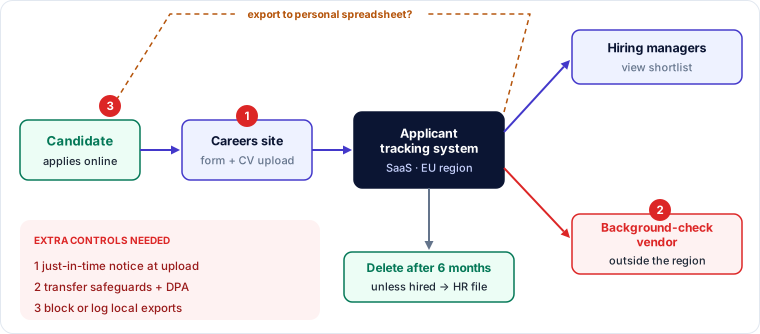
🔐 Privacy lens
Data maps are also attack maps. The flows that cross trust boundaries (to vendors, to other countries, to personal devices and spreadsheets) are where breaches and unlawful transfers most often happen. Mark them and review their controls first.
4. Building and maintaining the inventory
Three methods work best together:
- Questionnaires and workshops with process owners capture purposes, bases and context that tools cannot see.
- Automated discovery (data discovery and classification tools, cloud data security posture tools) scans databases, file shares, cloud storage and SaaS for personal data patterns, finding "shadow" copies people forget.
- Integration with existing processes: procurement, architecture review, change management and the configuration database add new systems and vendors automatically.
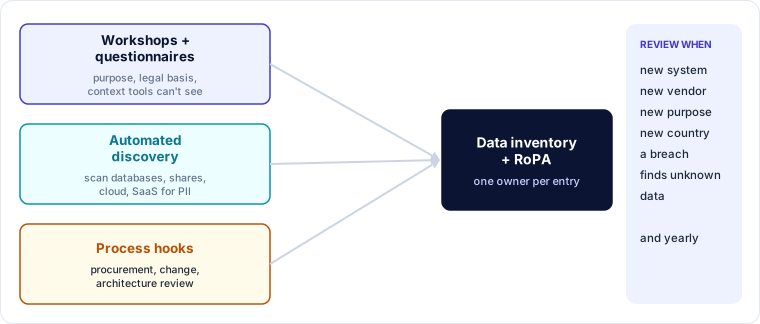
Keep it current with an owner for every entry, an annual review, and triggers: new system, new vendor, new purpose, new country, or a breach that reveals unknown data.
Worked example — the forgotten spreadsheet
A clinic answers a patient's access request using its records system. Two weeks later the patient complains: a reception spreadsheet of "difficult patients", including notes about them, was not disclosed.
| Gap | Fix |
|---|---|
| Spreadsheet not in the inventory | Automated discovery scan of file shares and email attachments; found 37 more personal-data files |
| No owner or purpose | Assigned owners; deleted 22 files with no valid purpose; moved the rest into the records system |
| Notes were subjective and unfair | Guidance on factual, respectful record keeping; notes reviewed |
| Access request process missed it | Request checklist now includes shared drives and email, guided by the inventory |
| Accountability | Incident recorded; training for reception staff; inventory review added to quarterly checks |
Key takeaways
- Inventory (where), record of processing (why) and data-flow map (how) together let you control personal data.
- A RoPA entry covers purpose, basis, subjects, categories, recipients, transfers, retention, security, systems and DPIA status.
- Map flows across the lifecycle and mark trust-boundary crossings.
- Combine workshops, automated discovery and process hooks; assign owners and review regularly.
Self-check
- What is the difference between a data inventory and a record of processing?
- Name five fields in a record of processing.
- Why is automated discovery useful even when process owners fill in questionnaires?