
Individual rights and handling requests
In this lesson you will:
- Describe the main privacy rights and how they differ across laws
- Run a rights request from intake to closure
- Verify identity proportionately without creating new risks
- Apply exemptions and deadlines correctly
Rights give people practical control over their data. For organisations, rights requests are a daily operational test: can you find everything you hold about one person, quickly, and act on it correctly?
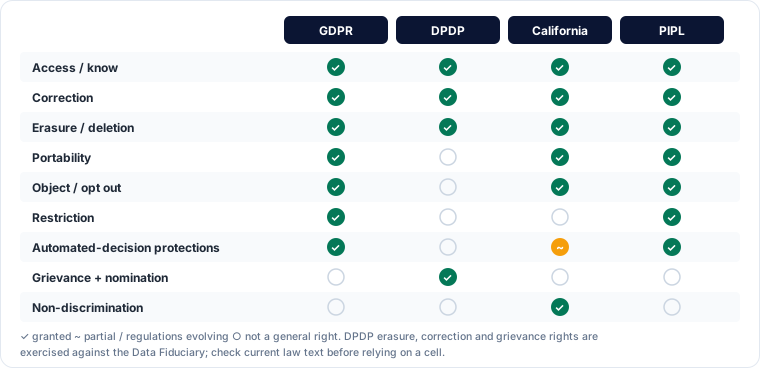
1. The rights
| Right | What the person can ask | Where it appears |
|---|---|---|
| Access / know | Confirm whether data is processed, get a copy and key details | Almost every law |
| Correction | Fix inaccurate or incomplete data | Almost every law (DPDP: correction, completion, updating) |
| Erasure / deletion | Delete data when it is no longer needed, consent is withdrawn or it was processed unlawfully | GDPR, DPDP, US states, LGPD, PIPL |
| Restriction | Pause use while a dispute is resolved | GDPR |
| Portability | Receive data in a machine-readable format, or have it sent to another provider | GDPR, US states, LGPD, PIPL |
| Objection / opt-out | Stop processing based on legitimate interests, and always stop direct marketing | GDPR; US states (opt out of sale, sharing, targeted ads, profiling) |
| Automated decisions | Not be subject to solely automated decisions with significant effects, or get human review | GDPR, several US states, PIPL |
| Withdraw consent | Stop consent-based processing | All consent-based laws |
| Grievance and nomination | Complain to the organisation first; nominate someone to act on death or incapacity | DPDP |
| Non-discrimination | Not be penalised for using rights | US state laws |
2. Running a request
A reliable process has six steps.
- Intake. Accept requests through any reasonable channel (web form, email, app, phone, in person). Staff must recognise a request even when it does not use legal words: "send me everything you have on me" is an access request.
- Log and acknowledge. Record the date received; the clock usually starts now. Acknowledge and explain next steps.
- Verify identity proportionately (section 3).
- Locate data across all systems using the data map: core databases, CRM, email, support tickets, backups, logs and processors. Ask processors to help, as their contracts require.
- Review and decide. Apply exemptions, remove other people's personal data from copies, and decide what to provide, correct or delete.
- Respond and close. Reply securely, in clear language, explaining what you did and how to complain. Record the outcome as evidence.
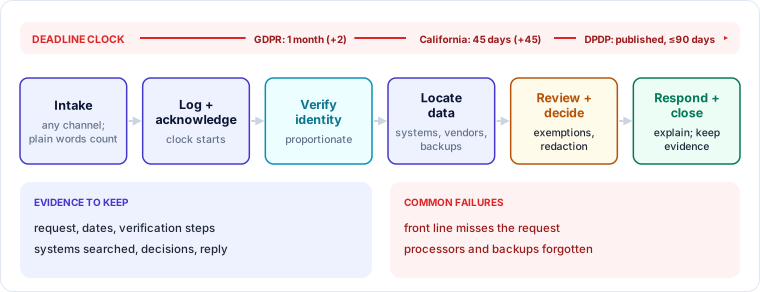
Deadlines differ. GDPR: one month, extendable by two further months for complex or numerous requests, with the person told why. California: 45 days, extendable once by 45 days. DPDP: the Rules require fiduciaries to publish how rights can be exercised and to resolve grievances within a maximum of 90 days. Build to the shortest deadline that applies.
Fees are usually not allowed for a first request; some laws permit a reasonable fee or refusal for manifestly unfounded or excessive requests, which you must be able to justify.
3. Verifying identity
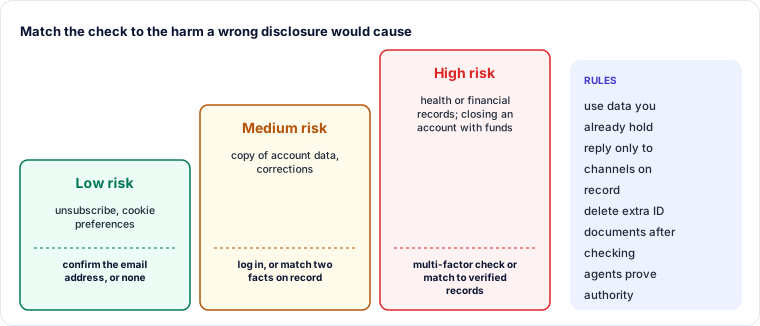
Sending one person's data to an impostor is a data breach. But demanding a passport scan to answer a newsletter subscriber creates a new, unnecessary store of sensitive data. Match verification to risk:
- Low risk (unsubscribe, cookie preferences): no verification, or confirm control of the email address.
- Medium risk (account data): ask the person to log in, or confirm two pieces of information you already hold.
- High risk (health records, financial history, deletion of an account with funds): stronger checks, such as multi-factor confirmation or matching against verified records.
Use data you already hold where possible, and delete any extra identity documents once verification is done. Authorised agents (lawyers, family members, nominees under DPDP) must show proof of authority.
🔐 Privacy lens
Attackers use access requests for social engineering: they pose as a customer to harvest data. Route responses only to verified channels already on record, never to a new email address supplied in the request.
4. Exemptions and limits
Rights are not absolute. Common limits:
- Legal retention: you can refuse deletion of records the law requires you to keep, but should restrict their use.
- Other people's rights: redact third parties' data from copies.
- Legal claims and investigations: data needed to establish or defend legal claims, or for law-enforcement purposes, may be withheld.
- Freedom of expression, research and archiving exemptions in some laws.
- Trade secrets: you may protect proprietary logic but must still give meaningful information about automated decisions.
Always explain a refusal, the reason and the right to complain to the regulator.
Worked example — a deletion request to a telecom operator
A customer emails: "Close my account and delete all my data."
| Step | Action |
|---|---|
| Intake | Support agent recognises a deletion request, logs it on day 0 and acknowledges it |
| Verify | Customer confirms with a one-time code sent to the registered mobile number |
| Locate | Data map shows CRM, billing, call records, marketing platform, support tickets, a credit-check vendor and backups |
| Decide | Delete marketing and support data; tell the marketing platform and vendor to delete; billing records kept for the period tax law requires; call records kept for the period telecom licence conditions require; backups expire on their normal cycle and are not restored for other uses |
| Respond | Day 12: reply listing what was deleted, what is retained, why, for how long, and how to complain |
| Evidence | Request, verification, systems checked, vendor confirmations and response stored in the rights log |
Key takeaways
- Core rights: access, correction, deletion, portability, objection or opt-out, and protection from solely automated decisions; DPDP adds grievance redressal and nomination.
- A six-step workflow (intake, log, verify, locate, decide, respond) makes requests repeatable and provable.
- Deadlines start on receipt: one month (GDPR), 45 days (California), and a published maximum under DPDP.
- Verification must be proportionate and must not create new sensitive data stores.
- Exemptions exist but must be explained to the requester.
Self-check
- A customer writes "what do you know about me?" without mentioning any law. What should happen?
- Why is asking every requester for a passport copy a poor practice?
- When can an organisation refuse to delete data?