
5.1 How to conduct a threat modelling session
In this lesson you will:
- Prepare a session: scope, participants, pre-read and a draft diagram.
- Run a 90-minute session with a clear agenda and roles.
- Use facilitation techniques that get everyone contributing, not just the loudest voice.
- Recognise and recover from the common ways sessions fail.
- Adapt the session for remote teams and for AI systems.
Opening case: the session that went sideways
Kestrel's first threat modelling session on the partner API (used by accounting software vendors to pull merchants' transactions) starts with nine people and no agenda. The architect spends 35 minutes explaining the system. A senior developer and the security engineer then argue for 20 minutes about whether OAuth refresh tokens should be rotated. Two junior developers and the tester say nothing. With ten minutes left, someone writes "API abuse?" on the whiteboard. The meeting ends with no list, no owners and a vague plan to "follow up".
By the end of this section you will be able to run the same 90 minutes so that it ends with a reviewed diagram, a rated list of specific threats and named owners.
Before the session
Most of a session's quality is decided before it starts.
Confirm the scope. Use the scope statement from Section 1.2: what is being modelled, what is out of scope, the question, the depth, and who decides on residual risk. Send it with the invitation.
Draft the diagram. The architect or tech lead prepares a Level-1 DFD in advance, with trust boundaries and labelled flows. It does not need to be perfect; the session will fix it. Having a draft saves the first 30 minutes and avoids a lecture.
Choose participants. Five to eight people is ideal. You need:
| Role | Why |
|---|---|
| Facilitator | Runs the method and the clock; stays neutral; often the security champion or a security engineer |
| Scribe | Records threats, decisions and actions live, visible to everyone; not the facilitator |
| Architect or tech lead | Knows how it works and why it was designed that way |
| Developers (one or two) | Know how it really works, including the shortcuts |
| Tester | Thinks about how to break and verify things |
| Product owner | Knows what matters to the business; can make or escalate risk decisions |
| Specialists as needed | Operations, data, privacy, ML engineer for AI components, owner of systems an agent can change |
Send a short pre-read. The scope, the draft diagram, a one-page reminder of STRIDE (or whichever method you are using), and the rating scale. Ask people to note anything wrong with the diagram before the session.
Prepare the space. A shared whiteboard (physical or online) with the diagram, a threat register template ready to fill, and the STRIDE prompts visible.
The 90-minute session
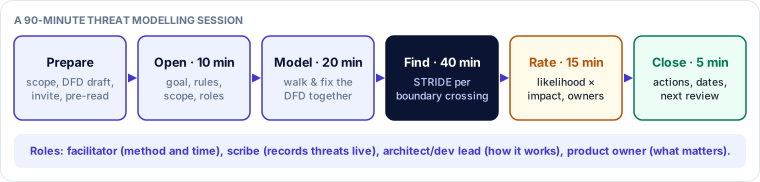
Open (10 minutes)
State the goal ("leave with a rated list of threats for the partner API, with owners"), the scope, the method and the ground rules:
- No idea is stupid. Write it down first; filter later.
- Threats, not blame. We are criticising the design, not the people who built it.
- Park deep dives. If a topic needs more than five minutes, it goes on a "parking lot" list with an owner.
- Decisions are recorded. If it isn't written down, it didn't happen.
Model (20 minutes)
Walk the draft DFD together. The facilitator asks the architect to trace one or two main user journeys across the diagram, and asks the room: "Is this right? What's missing?" Expect corrections: a forgotten queue, a support tool with database access, a second authentication path. Add trust boundaries and label every boundary-crossing flow. Record assets and assumptions as they come up.
Practitioner tip. Ask a developer, not the architect, to trace the journey. Developers know how the system actually works today; architects often describe how it was meant to work.
Find threats (40 minutes)
Work boundary crossing by boundary crossing, applying STRIDE (per-interaction for a large diagram, per-element for a small one). For each crossing:
- The facilitator reads out the flow: "Accounting software → Partner API, over HTTPS, OAuth access token, returns transactions."
- Go through the letters that apply, with a prompt for each: "How do we know it's really the vendor? What if the vendor's token is stolen? Can a vendor read a merchant who hasn't authorised them? Can they change data? Can they deny a request? Can one vendor exhaust our capacity?"
- The scribe records each threat as a specific statement (Section 5.2), with STRIDE category and any existing controls.
Spend the most time on the crossings with the highest-value assets. If time is short, it is better to cover the three most important crossings thoroughly than every crossing superficially.
Techniques to get everyone contributing:
- Silent brainstorming. Give everyone three minutes to write threats on sticky notes (or in a shared document) for the current crossing before discussion. This stops the loudest person setting the agenda and draws out quieter members.
- Round robin. Go round the room asking each person for one threat or "pass".
- Attacker personas. "You are a fraud ring with one compromised vendor account. What do you try?" (persona non grata, Section 2.3).
- Cards. Deal Elevation of Privilege cards, or AI and privacy decks, and ask each person to see whether their card applies.
- Assume breach. "Assume this component is compromised. What can the attacker reach next?" This finds missing internal boundaries.
Rate and assign (15 minutes)
Rate each threat with the agreed likelihood and impact scale (Section 2.2). Do not aim for precision; aim for agreement on which are red, amber and green. For each red and amber threat, name an owner who will propose the response and create the ticket. Note any threat that exceeds the team's authority to accept.
Close (5 minutes)
Read back the top threats and their owners. Confirm the parking lot items and their owners. Agree when the model will next be reviewed (for example at the end of the epic, or on the next trigger). Thank people, and send the record within 24 hours.
When sessions go wrong
| Symptom | What's happening | What to do |
|---|---|---|
| The architect lectures for half the session | No draft diagram, or the facilitator didn't redirect | Send the draft in advance; timebox modelling; ask a developer to trace a journey |
| Two experts debate one control for 20 minutes | A deep dive hijacking the session | Park it with an owner and a deadline; move on |
| Silence | People unsure what is expected, or afraid to look ignorant | Silent brainstorming, round robin, cards; model it yourself with a deliberately simple threat |
| "That can't happen, we use OAuth" | Control blindness: confusing a mechanism with a guarantee | Ask "what would have to be true for it to happen?" and "how would we know?" |
| Every threat rated 5/5 | No agreed scale, or fear-driven rating | Use the written scale with examples; ask "compared with T1, is this higher or lower?" |
| Dozens of vague threats | Category labels instead of statements | Use the threat statement template; merge duplicates at the end |
| Defensiveness | Team feels judged | Restate "threats, not blame"; credit existing controls in the register |
| No decisions | Admiration for the problem | Reserve the rating and owners slot; the facilitator protects it |
Remote sessions
Remote sessions work well with some adjustments:
- Use a shared online whiteboard that everyone can edit, with the DFD and a threat register table on the same board.
- Keep cameras on if the team is comfortable; use the chat for parallel ideas and have the scribe capture them.
- Use silent brainstorming more, because talking over each other is harder remotely.
- Break into two shorter sessions (for example 2 × 60 minutes) rather than one long one.
- For distributed time zones, run asynchronous pre-work: participants add threats to the board before a shorter live session focused on rating and decisions.
Sessions for AI systems
For AI components, adjust the preparation and the prompts (Module 4):
- Invite an ML or data engineer, the data owner, and for agents the owners of every system the agent's tools can change.
- Prepare the DFD with the AI lifecycle elements, every untrusted-content entry point marked, and, for agents, the tool and permission table.
- Add prompts to the threat-finding step: "Where did this data and this model come from?" "What text from outside can reach the context?" "If an attacker controlled that text, what could the model or agent do with its permissions?" "What does the system do when the model is wrong?" "How would we know what the agent did, and why?"
- Check coverage against the OWASP LLM or Agentic Top 10 in the last ten minutes of the threat-finding step.
The opening case, resolved
The re-run session on the partner API had a draft DFD sent two days ahead, six participants with clear roles, and the 90-minute agenda. The refresh-token debate was parked in two minutes with the security engineer as owner. Silent brainstorming on the vendor-to-API crossing produced 14 notes in three minutes, including the most important finding of the day from a junior developer: a vendor whose merchant had revoked access could still use a refresh token issued earlier, because revocation only deleted the access token. The session ended with 11 rated threats, three red, each with an owner, and the record was sent the same afternoon.
Check your understanding
1. Why should the scribe not be the facilitator?
Answer: The facilitator needs to watch the room, manage time and apply the method. Recording live is a separate full-time job. Combining them means either the record is poor or the session drifts.
2. Twenty minutes into threat-finding, two engineers start debating the best encryption library. What should the facilitator do?
Answer: Record the underlying threat if there is one, put the library choice in the parking lot with an owner and a date, and move to the next crossing.
3. What extra preparation does a session on an AI agent need compared with a traditional web service?
Answer: A DFD showing the AI lifecycle elements and untrusted-content entry points, a table of the agent's tools with capability, authority and approval, and the right people: an ML or data engineer and the owners of systems the agent can change.
Key takeaways
- Prepare: scope statement, draft DFD, five to eight people with defined roles, short pre-read.
- Run a timeboxed agenda: open, model, find threats boundary by boundary, rate and assign, close; send the record within 24 hours.
- Use silent brainstorming, round robins, personas, cards and assume-breach prompts to get everyone contributing.
- Park deep dives, use the written rating scale, and protect the time for decisions.
- For AI systems, add the right people, the lifecycle and untrusted-input view of the DFD, and AI-specific prompts.