
1.1 What threat modelling is and why it matters
In this lesson you will:
- Define threat modelling in one sentence and say what a finished threat model contains.
- Use the four threat modelling questions to structure an analysis of any system, from a web form to an AI agent.
- Use the words asset, threat actor, threat, vulnerability, risk and control precisely, and explain how they relate.
- Explain why a design flaw found on a whiteboard costs a fraction of the same flaw found in production.
- Recognise the values, principles and anti-patterns set out in the Threat Modeling Manifesto.
Opening case: the payout that went to the wrong account
Kestrel Pay (a fictional company used throughout this course) is a Bengaluru-based payment aggregator. Around 40,000 small merchants use it to send payment links, accept UPI and card payments, and receive settlements into their bank accounts every morning.
In its second year, Kestrel added a feature that merchants had been asking for: changing the settlement bank account from the merchant portal instead of emailing support. The feature passed functional testing, code review and an automated vulnerability scan. It shipped on a Friday.
Three weeks later, eleven merchants complained that their settlements had not arrived. The money had gone, on schedule, to accounts the merchants had never seen. An attacker had found that the "update payout account" request carried the merchant ID in the request body, and the server never checked that the logged-in user belonged to that merchant. Changing one number in the request was enough.
Every component did exactly what it was built to do. The flaw was in the design: nobody had asked, "Who could call this, and what stops them changing someone else's account?" By the end of this section you will be able to name the practice that asks that question systematically, and explain why it would have been the cheapest place to catch this bug.
What threat modelling is
Threat modelling is a structured way of looking at a system to find what could go wrong with its security (and, increasingly, its privacy and safety) before it goes wrong, and to decide what to do about it.
The Threat Modeling Manifesto, written in 2020 by a group of practitioners and researchers, gives a useful definition: threat modelling is analysing representations of a system to highlight concerns about security and privacy characteristics [1]. Three ideas in that definition matter:
- Representations. You do not threat model the running system directly. You model a picture of it: a data flow diagram, an architecture sketch, a sequence diagram, a list of components. The quality of your analysis depends on how faithful the picture is.
- Analysis. Threat modelling is thinking, not scanning. Tools help, but the core activity is people asking structured questions about a design.
- Concerns. The output is a set of concerns (threats) that need decisions, not a pass or fail verdict.
A finished threat model normally contains four things:
- A model of the system: what it does, its components, data, users and trust boundaries.
- A list of threats: each one a specific statement of what could go wrong.
- Decisions: for each threat, whether to mitigate, eliminate, transfer or accept it, with owners.
- Validation: evidence that the model is accurate and that the mitigations were built and work.
Notice what is not on the list: a penetration test report, a vulnerability scan or a compliance checklist. Those are useful, but they look at an implementation. Threat modelling looks at a design, which is why it can happen before a line of code exists.
The four questions
Adam Shostack's four-question framework is the most widely used way to structure threat modelling, and it underpins the Manifesto [1][2]. Every method in this course, from STRIDE to the AI-specific frameworks in Module 4, is a way of answering one or more of these questions.
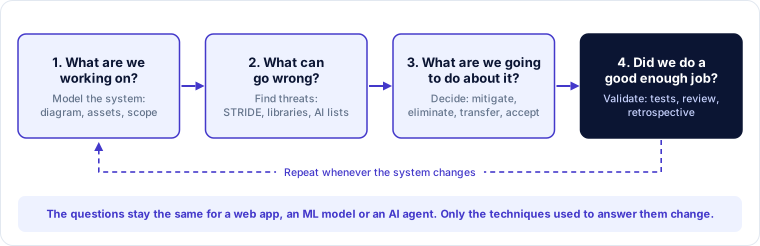
1. What are we working on? Build a shared picture of the system. This usually means a data flow diagram (Section 1.2), plus a list of the assets that matter and the scope of the exercise. Many threat modelling sessions discover their most important finding here: two engineers draw the same system differently, and the gap between their pictures is where the bug lives.
2. What can go wrong? Find threats. This is where methods such as STRIDE (Module 2), threat libraries such as CAPEC, MITRE ATT&CK and the OWASP lists, and attack trees come in. They help you think like an attacker in a disciplined way rather than relying on whoever happens to be the most imaginative person in the room.
3. What are we going to do about it? For each threat, decide how to respond: add a control, remove the feature, transfer the risk, or accept it with sign-off. Turn decisions into backlog items with owners (Module 5).
4. Did we do a good enough job? Check the model against reality, check that mitigations were built, test them, and hold a short retrospective on the exercise itself. Then go round the loop again when the system changes.
Practitioner tip. When a stakeholder asks "do we need a threat model?", answer with the four questions instead of the jargon. Almost nobody argues against "what are we building, what could go wrong, what will we do about it, and did we do a good job?"
Worked example: the four questions on the payout feature
Here is how a 30-minute conversation with the Kestrel team could have run before the payout-account feature was built.
| Question | What the team would have said |
|---|---|
| What are we working on? | A new endpoint, POST /merchant/payout-account, called from the merchant portal. It writes the bank account number and IFSC code to the merchant database. The settlement job reads that field at 05:00 every day and sends money to it. |
| What can go wrong? | Someone changes the account for a merchant they do not belong to. Someone takes over a merchant login and changes the account. A merchant changes the account, money goes missing, and they claim they never did it. Support staff are tricked into changing it. |
| What will we do about it? | Check server-side that the session's user belongs to the merchant ID in the request. Require step-up authentication (fresh OTP) for this change. Hold the first settlement to a new account for 24 hours and notify the old contact details. Log the change with user, time, IP and old and new values. |
| Did we do a good enough job? | Add an automated test that tries to change another merchant's account and expects a 403. Ask the pen testers to target this endpoint. Review the log entries in staging. |
Every one of those mitigations is cheap at design time. The first one alone would have stopped the attack in the opening case.
The vocabulary
Threat modelling discussions go wrong quickly when people use "threat", "risk" and "vulnerability" as if they mean the same thing. They do not.
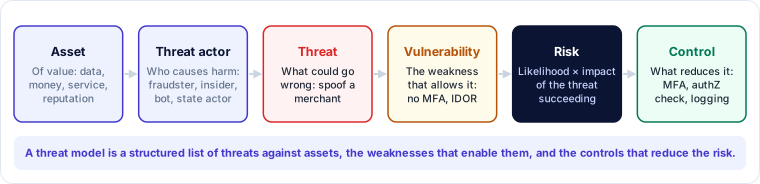
- An asset is something of value that you want to protect: merchant settlements, customer KYC documents, the availability of the payment API, the signing key used with the sponsor bank, Kestrel's reputation with the regulator. Assets are not only data.
- A threat actor is a person or thing that could cause harm: an external fraudster, a malicious or careless insider, a competitor, an automated bot, a compromised partner. In AI systems, a manipulated AI agent can also act as one.
- A threat is something that could go wrong: a way an asset could be harmed. "An attacker changes another merchant's payout account" is a threat.
- A vulnerability (or weakness) is the property of the system that lets a threat succeed: "the endpoint does not check that the user belongs to the merchant". The same threat can be enabled by different vulnerabilities, and fixing one may leave others open.
- Risk combines the likelihood that a threat succeeds with the impact if it does. Risk is what you prioritise by.
- A control (or mitigation, or countermeasure) reduces risk, by making the threat less likely, reducing its impact, or detecting it so you can respond.
The attack surface is the sum of the places where an attacker can try to interact with the system: entry points, interfaces, stored data, people and dependencies. Threat modelling is largely the discipline of mapping the attack surface and asking what could happen at each point of it.
Practitioner tip. Threats are phrased from the attacker's or failure's point of view ("an attacker can…", "the model may…"). Vulnerabilities describe the system ("the API does not…"). Controls describe what you will do ("the API will check…"). Keeping the three grammatically distinct makes threat registers far easier to read.
Why threat model at design time
Security testing finds bugs in what was built. Threat modelling finds flaws in what was designed. That difference matters for three reasons.
Design flaws are expensive to fix late. Missing authorisation, an unencrypted channel between two services, a trust assumption about a partner, a feature that should not exist: none of these can be patched with one line of code once they are built in. Fixing them late often means redesign, data migration and re-testing.
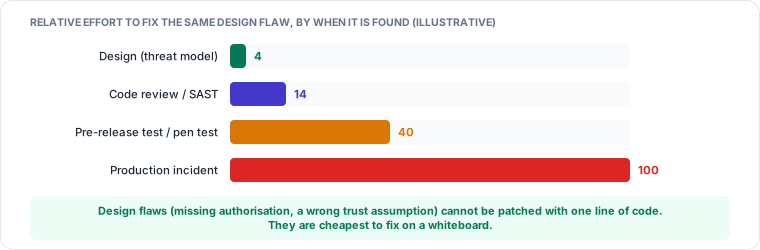
The numbers in Figure 1.3 are illustrative, not a measured law. Studies of defect cost vary widely, and some popular figures are poorly sourced. The direction, however, is consistent with practitioner experience: the later a design flaw is found, the more work has been built on top of it.
Scanners cannot see intent. A static analysis tool can find a SQL injection because the pattern is recognisable in the code. It cannot know that merchant users should only change their own payout account, because that is a business rule that exists only in people's heads and in the design. The Kestrel bug was invisible to the scanner for exactly this reason. Broken access control has topped the OWASP Top 10 for web applications since 2021 largely because it is a design and logic problem [3].
It creates shared understanding. A good threat modelling session gets the architect, developers, tester and product owner looking at the same picture. Teams often report that the diagram itself, and the arguments about it, were as valuable as the threat list.
Where threat modelling sits among other activities
| Activity | Looks at | Finds | When |
|---|---|---|---|
| Threat modelling | Design (a model of the system) | Design flaws, missing controls, wrong assumptions | Design, and on every significant change |
| Secure code review / SAST | Source code | Coding errors (injection, unsafe functions) | Build |
| DAST / vulnerability scanning | Running application | Known vulnerability patterns, misconfiguration | Test, operations |
| Penetration testing | Running system, attacker's view | Exploitable chains, often including design flaws | Pre-release, periodically |
| Risk assessment (enterprise) | Business processes and assets | Organisation-level risks | Annual or on major change |
These activities feed each other. A threat model tells the penetration tester where to look hardest; a pen-test finding that the model missed is a signal to improve the model (Question 4).
What the Threat Modeling Manifesto says
The Manifesto is short and worth reading in full [1]. It sets out values, principles, patterns and anti-patterns. The values are phrased in the style of the Agile Manifesto, valuing one thing over another:
- A culture of finding and fixing design issues over checkbox compliance.
- People and collaboration over processes, methodologies and tools.
- A journey of understanding over a security or privacy snapshot.
- Doing threat modelling over talking about it.
- Continuous refinement over a single delivery.
Among the anti-patterns it warns against, three are worth remembering because you will meet them often:
- The hero threat modeller. Relying on one expert's talent. Threat modelling should be a skill the whole team can practise with a method, not a gift.
- Admiration for the problem. Spending the whole session on fascinating attack scenarios and never getting to decisions and fixes.
- The perfect representation. Spending weeks on the perfect diagram. A rough, shared diagram that you can analyse beats a beautiful one that arrives too late.
Exercise: classify the statements
Classify each statement as an asset, threat actor, threat, vulnerability, risk or control. Answers follow.
- "The settlement file is written to a shared SFTP folder that all operations staff can edit."
- "An insider modifies the settlement file to redirect one merchant's money."
- "Daily settlements worth around ₹40 crore."
- "The settlement file is signed with a key held in a hardware security module, and the bank rejects unsigned files."
- "Likely within a year, with losses up to ₹2 crore and a reportable incident."
- "A disgruntled operations analyst."
Answers. 1 is a vulnerability (a property of the system). 2 is a threat. 3 is an asset. 4 is a control. 5 is a risk (likelihood and impact). 6 is a threat actor.
The opening case, resolved
The Kestrel payout bug was an insecure direct object reference (IDOR), a form of broken access control: the server trusted an object identifier supplied by the client without checking that the caller was entitled to it. It passed code review because each line of code was correct; it passed the scanner because the scanner had no way to know the business rule.
A threat modelling conversation around the four questions would very likely have caught it, because "What can go wrong?" asked about a write operation on a money-moving field almost always produces "someone writes to an account that isn't theirs". The fix (a server-side ownership check) costs an hour at design time. In production it cost Kestrel the settlements, a notification to its sponsor bank, a CERT-In report within six hours of noticing the incident [4], and three weeks of incident response.
Check your understanding
1. A product manager says, "We already run a penetration test before every release, so threat modelling is redundant." What is the strongest response?
Answer: Penetration testing examines what was built, late in the cycle, within a time box, and finds what one team of testers had time to try. Threat modelling examines the design, early, when flaws such as missing authorisation or wrong trust assumptions are cheapest to fix, and it tells the pen testers where to focus. The two are complementary.
2. "Our API has no rate limiting" — is this a threat, a vulnerability or a risk?
Answer: A vulnerability. The threat would be "an attacker floods the API and makes it unavailable to merchants during a sale". The risk would combine how likely that is with how bad it would be.
3. Your team spends two weeks perfecting a diagram before the first session. Which Manifesto anti-pattern is this, and what would you do instead?
Answer: The perfect representation. Start with a rough Level-1 diagram that the team agrees is roughly right, analyse it, and improve it as you learn.
Key takeaways
- Threat modelling analyses a representation of a system to find security and privacy concerns, and records decisions about them.
- Four questions structure all of it: what are we working on, what can go wrong, what are we going to do about it, did we do a good enough job.
- Keep the vocabulary precise: assets are protected, threat actors cause threats, vulnerabilities enable threats, risk is likelihood × impact, controls reduce risk.
- Design flaws such as broken access control are invisible to scanners and cheapest to fix on a whiteboard.
- Value people, collaboration and continuous refinement over tools and one-off reports; avoid the hero threat modeller, admiration for the problem and the perfect representation.