
1.2 Modelling the system: data flow diagrams and trust boundaries
In this lesson you will:
- Draw a data flow diagram (DFD) using external entities, processes, data stores, data flows and trust boundaries.
- Place trust boundaries correctly and explain why most threats sit where data crosses them.
- Choose the right level of detail, and know when to zoom in.
- Record the assets, entry points and assumptions that go with a diagram.
- Write a scope statement for a threat modelling exercise.
Opening case: two diagrams of one system
Kestrel's security lead asks two engineers to sketch the settlement process on a whiteboard, separately.
The backend engineer draws the settlement job reading the transactions database and calling the sponsor bank's API. The operations engineer draws the settlement job writing a file to an SFTP folder, an operations analyst checking it, and a script at the bank picking it up.
Both are right. The API path was built last year; the file path was supposed to be retired but is still used for about 15% of merchants whose banks are not on the API. Nobody on the security team knew the file path still existed. It has no signing, and the SFTP folder is writable by every operations account.
By the end of this section you will be able to draw a diagram that would have exposed this, and explain why the place where the two engineers disagreed is exactly where to look for threats.
Why diagrams come first
Question 1, "What are we working on?", is answered with a model of the system. You cannot find threats in a system you cannot see, and you cannot discuss it with a team unless everyone sees the same thing.
Many notations work: architecture diagrams, sequence diagrams, swim lanes, even a list of components. The most widely used for threat modelling is the data flow diagram (DFD), because it shows exactly what an attacker cares about: where data enters, where it goes, where it is stored and where the level of trust changes. STRIDE-per-element (Module 2) is built on DFD elements, so DFDs are this course's default.
The five DFD elements
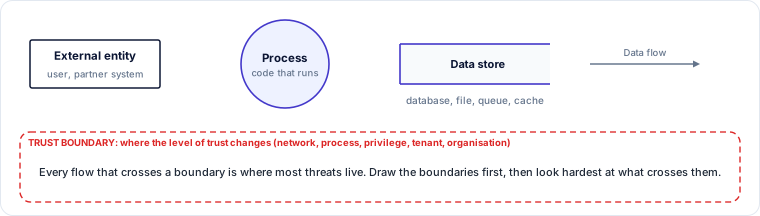
External entity (rectangle). Anything outside your control that interacts with the system: a merchant using a browser, an operations analyst, the sponsor bank's API, a third-party SaaS. You model threats from external entities, not inside them.
Process (circle). Code that runs and transforms data: a web service, an API gateway, a batch job, a Lambda function, a model inference service. Processes are where most kinds of threat can occur, because they make decisions.
Data store (open-ended rectangle or parallel lines). Anywhere data rests: a database, a file share, an object storage bucket, a message queue, a cache, a log, a vector database, an agent's memory.
Data flow (arrow). Data moving between two elements: an HTTPS request, a database query, a file transfer, a message on a queue. Label each flow with what it carries and how ("card token over mTLS", "settlement file over SFTP"). A flow that goes both ways can be drawn as a double-headed arrow when the two directions carry the same kind of data.
Trust boundary (dashed line or box). A line where the level of trust changes. Data that crosses a trust boundary is moving from a place where one set of assumptions holds to a place where different ones hold.
Rules that keep a DFD honest
- Data does not move by itself. Every flow starts or ends at a process. A flow straight from an external entity to a data store, or from one store to another, means a process is missing from the diagram (something is doing the moving). Find it and draw it.
- Every store has a writer and a reader. A store that is written but never read, or read but never written, usually means something is missing.
- Label the flows. An unlabelled arrow cannot be analysed. Say what data moves and over what protocol.
- Show people. Operations staff, support agents and administrators are external entities with powerful access. They are frequently left off architecture diagrams, and they are frequently the path attackers use.
Trust boundaries
A trust boundary is the most important thing on the diagram. Typical boundaries are:
- Network: internet to DMZ, DMZ to internal network, your cloud account to a partner's.
- Process or privilege: a user-mode process calling a kernel, a web server calling a database with a different account, a container talking to its host.
- Tenant: one customer's data from another's in a multi-tenant SaaS.
- Organisation: your systems and a vendor's, a partner's or a cloud provider's.
- Physical or device: a customer's phone, a point-of-sale terminal, a laptop.
- Human: the point where a person makes a decision that the system acts on.
The reason boundaries matter is simple. Inside a boundary, components trust each other to some degree. When data crosses a boundary, the receiving side must not assume the sender is who it claims to be (spoofing), that the data has not been changed (tampering), or that the data is well formed and safe to act on (injection, elevation of privilege). Every flow that crosses a trust boundary deserves a threat-by-threat look.
Practitioner tip. If you are short of time, list the flows that cross a boundary and analyse only those. In most real systems that is a small fraction of all flows and a large fraction of the serious threats.
Choosing the level of detail
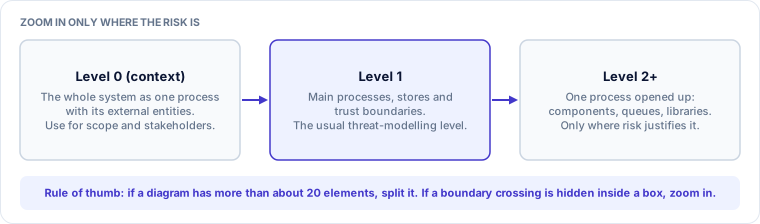
- A Level 0 or context diagram shows the whole system as a single process with its external entities. It is good for scope and stakeholder conversations but too coarse to find most threats.
- A Level 1 diagram opens the system into its main processes, stores and boundaries. This is where most threat modelling happens.
- Level 2 and below open one process into its parts. Use them only where the risk justifies it: the payment authorisation path, the component that handles keys, the AI agent's tool layer.
Two signs you need to zoom in: a single box hides a trust boundary (for example, "backend" contains both the merchant API and the admin API), or a box makes a security decision you cannot see (for example, "auth service" with no detail on tokens or sessions). Two signs you have gone too deep: more than about 20 elements on one diagram, or elements that the team cannot say anything security-relevant about.
Worked example: the Kestrel Level-1 DFD
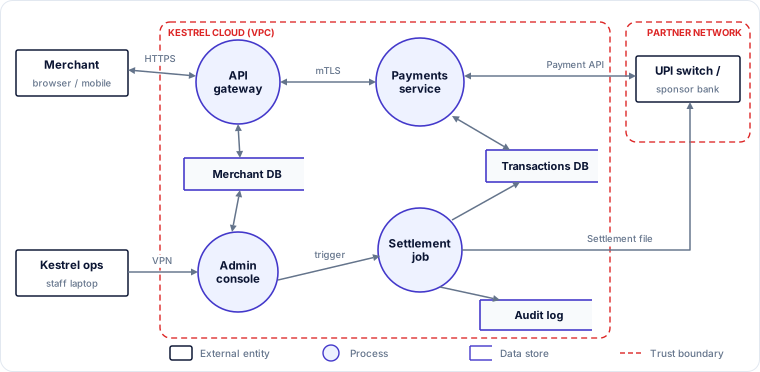
Figure 1.6 is the Level-1 diagram the Kestrel team agreed on after the whiteboard argument.
Read it element by element.
External entities. Merchant (browser or mobile app, on the internet), Kestrel ops (staff on laptops, over VPN) and UPI switch / sponsor bank (in the partner's network).
Processes. API gateway (terminates TLS, authenticates merchants, routes requests), Payments service (creates payment links, records transactions, calls the bank), Admin console (used by operations to manage merchants and settlements) and Settlement job (runs at 05:00, totals each merchant's balance and pays out).
Stores. Merchant DB (profiles, KYC status, payout accounts), Transactions DB and Audit log.
Trust boundaries. The Kestrel cloud (VPC) boundary separates everything Kestrel runs from the internet, the staff laptops and the partner network. The partner network boundary encloses the bank.
Flows across boundaries. Merchant ↔ API gateway (HTTPS); Kestrel ops → Admin console (VPN); Payments service ↔ bank (payment API); Settlement job → bank (settlement file). These four crossings are where the analysis in Module 2 will concentrate.
Notice the settlement file flow. On the first draft it was missing. Drawing it, and asking "what is between the settlement job and the bank on this path?", is what surfaced the shared SFTP folder from the opening case. In a fuller Level-2 diagram the SFTP folder would appear as its own data store with operations staff able to write to it.
Assets, entry points and assumptions
A diagram on its own is not the full answer to Question 1. Record three lists with it.
Assets. What would hurt if it were stolen, altered or unavailable? For Kestrel: merchant settlements in transit; payout bank details; merchant KYC documents and personal data of proprietors; transaction history; the API credentials and signing keys used with the bank; availability of the payment API during peak hours; Kestrel's licence standing with the regulator.
Entry points. Where can someone outside a boundary send data in? For Kestrel: the merchant web app and mobile API, the payment-link page that customers open, webhooks from the bank, the admin console, the SFTP folder, the support mailbox (support staff act on emails). Entry points are the attack surface.
Assumptions. Things you are taking as true without checking in this exercise. Write them down, because a wrong assumption is a common root cause of serious incidents. For example: "The VPN enforces MFA for all staff." "The bank validates the signature on every API call." "Only the settlement job writes to the SFTP folder." The third assumption was false at Kestrel. Writing it down is what gets someone to check it.
Practitioner tip. Date and attribute each assumption ("confirmed by platform team, 12 Nov"), and turn any unconfirmed assumption that a high-impact threat depends on into an action item.
Scoping the exercise
Every threat modelling exercise needs a scope statement before it starts, or it will either sprawl or miss the point. A good scope says:
- The system or change being modelled ("the payout-account change feature and the settlement path that uses the field").
- What is out of scope and why ("the sponsor bank's internal systems, covered by their own assurance; the marketing website").
- The question being asked, if it is narrower than "everything" ("can a merchant's settlement be redirected?").
- The depth: a 30-minute story-level check, a 90-minute Level-1 session, or a multi-day deep dive on a critical component.
- The participants and the decision-maker for residual risk.
A scope that is too wide ("the whole platform") produces shallow analysis of everything. A scope that is too narrow ("just this endpoint") misses the place where the endpoint's data is used, which is exactly how the payout bug in Section 1.1 caused harm: the endpoint wrote a field, but the damage happened when the settlement job read it.
Diagrams for AI systems: a preview
Everything in this section applies to AI systems, with some additions that Module 4 covers in depth:
- New processes: model training pipelines, inference services, orchestrators that call a large language model (LLM), agents that plan and call tools.
- New stores: training datasets, model registries, vector databases, prompt templates, agent memory.
- New external entities: hosted model providers, public model hubs, labelling vendors, other organisations' agents.
- A new kind of boundary: between instructions and data inside a model's context window. An LLM reads system instructions, user input and retrieved documents as one stream of text, so content that arrives as "data" can act as "instructions". A DFD should mark every place where untrusted content enters a model's context.
The opening case, resolved
The two engineers disagreed because each had a partial picture, and the security team had a third, older one. Drawing a single Level-1 DFD forced the question "how does money get from the settlement job to the bank?", which exposed a second, forgotten path. That path crossed two trust boundaries (Kestrel to staff, Kestrel to bank) with no integrity protection and an assumption ("only the job writes to the folder") that was false.
The fix came out of the next section of the exercise (Module 2): sign the settlement file inside the job with a key held in a hardware security module, restrict the folder so only the job can write, and alert on any other write. The lesson for this section is that the diagram found the problem before any threat analysis began.
Check your understanding
1. A diagram shows an arrow straight from "Merchant" to "Merchant DB". What is wrong, and why does it matter?
Answer: Data cannot move from an external entity to a store without a process doing the moving. A process is missing, and it is the process that should be enforcing authentication, authorisation and validation, so it is exactly what you need to analyse.
2. A team's diagram has one box labelled "Backend" that serves both the merchant API and the admin API. Should they zoom in?
Answer: Yes. The box hides a trust boundary between merchant-level and admin-level privilege, which is where elevation of privilege threats live.
3. Which of these is the best scope statement? (a) "Threat model the platform." (b) "Threat model the new refund API, including the refund ledger and the job that executes refunds; the card network's systems are out of scope; 90-minute session; residual risk accepted by the Head of Payments."
Answer: (b). It names the change, the downstream use of its data, what is out of scope, the depth and the decision-maker.
Key takeaways
- Use a data flow diagram to answer "what are we working on?": external entities, processes, data stores, data flows and trust boundaries.
- Every flow must start or end at a process; label flows with data and protocol; include the people.
- Trust boundaries are where the analysis pays off. If time is short, analyse only the flows that cross them.
- Level 1 is the usual working level; zoom in where a box hides a boundary or a security decision.
- Record assets, entry points and dated assumptions alongside the diagram, and write a scope that includes where the data is used downstream.