
Data resilience: backup, immutability, isolated recovery and clean rooms
In this lesson you will:
- Apply the 3-2-1-1-0 rule to critical data
- Design backups that survive ransomware and administrator compromise
- Plan recovery from a cyber attack using an isolated recovery environment
- Prove recoverability through restore testing and integrity checks
For financial institutions, data is the business: ledgers, balances, holdings, positions, policies, claims. Systems can be rebuilt from code and images, but lost or corrupted data cannot be recreated by redeploying. Modern attackers know this. Ransomware groups routinely look for backups and delete or encrypt them before triggering the main attack. Data resilience is the discipline of making sure a clean, recent, usable copy always survives.
1. The 3-2-1-1-0 rule
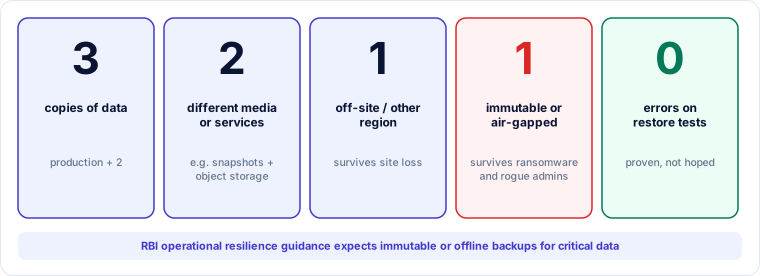
- 3 copies of data, including production.
- 2 different media or storage services, so one failure mode cannot destroy all copies.
- 1 copy off-site or in another region.
- 1 copy immutable (cannot be changed or deleted until a retention period ends) or air-gapped (logically or physically disconnected).
- 0 errors when restore tests are run.
RBI's operational resilience guidance specifically expects institutions to protect data through resilient backups, including immutable or offline copies. NIST's data integrity practice guides (SP 1800-11, -25 and -26) describe how to identify, protect, detect and recover from attacks on data.
2. Designing backups that survive an attacker
An attacker with domain or cloud administrator rights can usually delete anything that administrator can reach. Defences:
| Control | Purpose |
|---|---|
| Separate backup account or domain | Backup storage sits in a different cloud account or AD forest, with no trust from production |
| Separate credentials and MFA | Production administrators cannot log in to the backup environment; backup admin uses hardware MFA |
| Immutability | Object lock or WORM in compliance mode, so even the backup administrator cannot shorten retention |
| Delete protection with multi-person approval | Changes to retention or deletion need two people |
| Network isolation | Backup systems are reachable only through tightly controlled paths; vault copies may be air-gapped |
| Monitoring | Alerts on unusual deletion, retention changes, failed jobs or sudden change in backup size (a sign of encryption) |
| Encryption with protected keys | Keys stored so that losing production does not lose the ability to decrypt backups |
Retention depth matters for cyber recovery. Attackers often sit in a network for weeks before triggering ransomware, so the last clean backup may be weeks old. Keep enough history, for example daily backups for 35 days and weekly for 3 months, to go back past the likely intrusion date. Balance this against data protection rules on retention.
3. Recovering from a cyber attack: the clean room
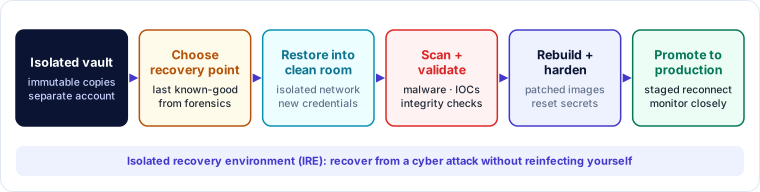
Traditional DR restores into the same environment as quickly as possible. After a cyber attack, that may restore the attacker's foothold too. An isolated recovery environment (IRE), or clean room, avoids reinfection:
- Vault. Immutable copies held in a separate, isolated account.
- Choose the recovery point. Forensic findings identify when the attacker got in and which data or systems were affected. Choose the latest point known to be clean.
- Restore into the clean room. A separate network segment or account, with new credentials, no trust to production and controlled internet access.
- Scan and validate. Malware scanning, checks for indicators of compromise, application integrity and data integrity checks (reconciling balances, totals and control figures).
- Rebuild and harden. Rebuild systems from trusted, patched images, rotate all secrets and keys, and close the vulnerability exploited.
- Promote. Reconnect in stages under heightened monitoring.
This takes longer than failover, which is why the BIA's MBCO and workarounds matter. You may need a degraded service, or a partner's service, to run while the clean room does its work.
4. Data integrity, not just availability
Backups protect against loss; they do not detect corruption. Financial data needs integrity controls:
- reconciliation of balances and positions with external sources (banks, clearing, depositories, aggregators);
- control totals and checksums for critical datasets;
- detection of unexpected mass changes;
- the ability to identify which transactions occurred after the recovery point, so they can be re-entered or reconciled.
Lesson 4.3 showed Tarang meeting zero RPO by reconciling against aggregator records. This is the same principle: know an independent source of truth for your most critical data.
5. Proving recoverability
An untested backup is a hope. Testing should include:
| Test | Frequency (typical, Tier 1) | Proves |
|---|---|---|
| Backup job monitoring | Daily | Jobs ran and completed |
| File or record-level restore | Monthly | Backups are readable |
| Full system restore to an isolated environment | Quarterly | RTO achievable from backup; procedures work |
| Clean-room recovery exercise | Yearly | Cyber recovery end to end, including forensics and validation |
| Immutability test | Yearly | Retention cannot be shortened or copies deleted, even by admins |
Record actual restore times and compare them with RTOs. Regulators and auditors ask for this evidence.
Auditor lens
Auditors ask: "Show me that a production administrator cannot delete your backups", "When did you last restore your core database in full, and how long did it take?" and "How would you know which backup is clean after ransomware?" Backups in the same account with the same credentials, or restore tests that only recover a few files, are high-risk findings.
Case study — Tarang Ledger: building the vault
Tarang's gap: backups were in the same cloud account as production, reachable by the same administrator roles. In a ransomware scenario they could be deleted (S-01).
New design:
- Backup vault account in the second region, under a separate organisational unit, with no production roles able to assume into it.
- Object lock in compliance mode: daily database backups retained 35 days, weekly for 13 weeks, monthly for 12 months, consistent with customer contracts and DPDP retention guidance.
- Vault admin uses hardware security keys; retention changes need approval from two of three named people (CTO, Meera, head of cloud operations).
- Alerts to the security operations team on any vault policy change or backup size anomaly.
- Clean room: an isolated account in the second region with its own network, a restore pipeline and a scanning toolkit. First full exercise planned for month 9.
First quarterly restore test: full production database restored into the clean room in 4 h 50 min (down from 6 h 20 min, thanks to parallel restore). Integrity validation against aggregator totals took 1 h 30 min more, which was not in the original estimate, so the runbook was updated.
Key takeaways
- Apply 3-2-1-1-0: three copies, two media, one off-site, one immutable or air-gapped, zero restore errors. RBI expects immutable or offline copies.
- Make backups survive an attacker: separate account and credentials, immutability, multi-person approval, isolation, monitoring, protected keys and enough retention depth.
- Recover from cyber attacks through a clean room: choose a known-good point, restore in isolation, scan, validate integrity, rebuild, then promote.
- Protect integrity with reconciliation against independent sources of truth.
- Test restores in full and time them against RTO.
Self-check
- What does the second "1" in 3-2-1-1-0 add, and why?
- Why might the last clean backup after ransomware be weeks old?
- What steps happen in a clean room before systems are promoted to production?