
Cryptographic and data protection controls for AI
In this lesson you will:
- Use DSPM to discover and assess AI data exposure
- Apply DLP and semantic filtering to AI inputs and outputs
- Protect data at rest, in transit and in use
- Manage the key lifecycle with KMS, BYOK, secrets management and rotation
- Implement purpose-based access controls, including for agents
- Sanitise high-density AI storage media
This lesson brings together the technical controls that protect AI data wherever it is: discovered, classified, filtered, encrypted, access-controlled and, finally, destroyed.
1. Data Security Posture Management (DSPM)
DSPM tools discover where sensitive data lives across cloud and SaaS, classify it, and flag risky exposure. For AI, use DSPM to:
- Find shadow training data — copies of production data in notebooks, buckets and feature stores.
- Identify sensitive data in vector databases and fine-tuning datasets.
- Detect over-permissive access to AI data stores (public buckets, broad roles).
- Track data flowing to AI services and model endpoints.
- Feed findings into the AI inventory and risk register.
2. DLP and semantic filtering on AI inputs and outputs
Traditional data loss prevention (DLP) uses patterns (regular expressions for card numbers, ID formats) and fingerprints. AI traffic needs more:
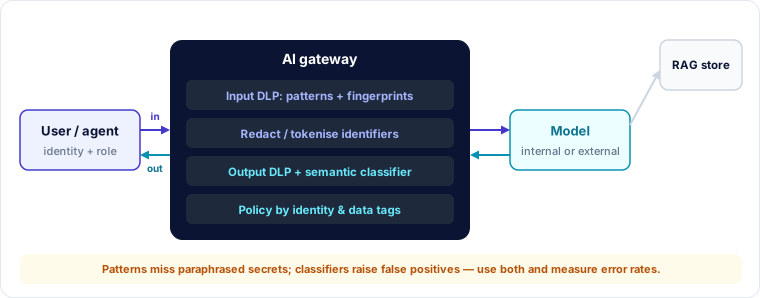
- Input side — detect and block, redact or tokenise sensitive data before prompts reach a model, especially an external one.
- Output side — detect sensitive data in responses (leaked from retrieval, memorised, or produced by an injected instruction) and block or redact it.
- Semantic filtering — classifiers that understand meaning, not just patterns: "this answer discusses an unreleased merger" or "this response contains another customer's details".
- Context-aware policy — the same content may be fine for one user and not another; filters should use identity and data tags.
Pattern-only DLP misses paraphrased or summarised secrets; semantic filters produce false positives. Use both, measure their error rates, and route edge cases to review.
3. Encryption across data states
| State | AI examples | Controls |
|---|---|---|
| At rest | Datasets, vector stores, model weights, checkpoints, logs | Storage encryption with managed keys; separate keys for high-sensitivity sets; encrypt backups |
| In transit | Prompts to model APIs, data to training clusters, inter-agent messages | TLS everywhere, mutual TLS between services, private endpoints |
| In use | Data and weights in CPU/GPU memory during training and inference | Confidential computing (TEEs) with attestation; isolation; memory scrubbing |
Encryption at rest does not protect against an application that is allowed to read the data — such as an over-privileged agent. It must be combined with access control.
4. Key management lifecycle
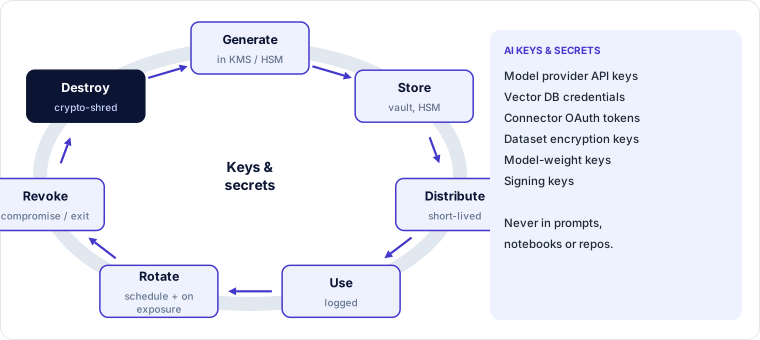
- KMS (key management service) — centralised generation, storage and use of keys, often backed by hardware security modules (HSMs), with policy and audit logging.
- BYOK (bring your own key) — the customer supplies or controls the keys a provider uses to encrypt its data, so the customer can revoke access. Variants include HYOK / external key management, where keys never leave customer control.
- Secrets management — model API keys, vector-database credentials, OAuth tokens and connector secrets belong in a vault, never in prompts, notebooks, code or environment files committed to repositories.
- Rotation — rotate keys and secrets on a schedule and immediately after suspected exposure; prefer short-lived, automatically issued credentials.
- Revocation and destruction — revoke on compromise or exit; destroying keys is also a sanitisation method (crypto-shredding).
5. Purpose-based and restricted data access
Role-based access asks who you are. AI needs a second question: for what purpose is the data being used?
- Purpose-based access control — data tagged with permitted purposes (e.g. "customer service", "fraud analytics"); access is granted only when the requesting workload's declared purpose matches.
- Agentic AI data catalogues — catalogues that tell agents which datasets exist, what they may be used for, and what access an agent may request, so agents discover data through governed paths rather than raw credentials.
- Restricted views — expose only the columns and rows a use case needs (for example, an assistant sees masked account numbers).
- Just-in-time access — temporary, approved access for specific tasks rather than standing permissions.
6. Media sanitisation for high-density AI storage
AI infrastructure holds huge datasets and checkpoints on dense SSD arrays, distributed file systems and accelerator memory. Sanitisation must be planned:
- Cryptographic erasure (crypto-shredding) — if data was encrypted with a dedicated key, destroying the key renders it unreadable. The practical method for cloud and distributed storage, where you cannot reach every physical block.
- Purge — device-level secure-erase commands for SSDs; overwriting is unreliable on flash because of wear-levelling and over-provisioning.
- Destroy — physical destruction (shredding to small particle sizes, sometimes called micro-shredding, disintegration, incineration) for the most sensitive media at end of life.
- Accelerator memory — ensure memory is cleared between tenants and jobs.
- Record sanitisation in line with recognised guidance (for example NIST SP 800-88) and obtain certificates from disposal vendors.
Worked example — securing a fine-tuning platform
| Finding (DSPM and review) | Control applied |
|---|---|
| Copy of production customer table in a data scientist's bucket | Deleted; fine-tuning now reads from a masked, purpose-tagged view |
| Model-provider API key hard-coded in a notebook | Revoked and rotated; keys issued from the vault per job, valid 1 hour |
| Training cluster traffic in plaintext inside the VPC | Mutual TLS enabled |
| Checkpoints encrypted with the account's default key | Per-project keys in KMS with BYOK for regulated clients; crypto-shred on project close |
| Old training SSDs returned to lease company | Purge with secure-erase plus crypto-erase; certificate recorded |
🔐 Security lens
Secrets in prompts are a classic AI mistake: a developer pastes an API key into a system prompt "for the agent to use". Prompts can be extracted. Credentials belong in a vault, injected into tool calls by the harness — never into the model's context.
Key takeaways
- DSPM finds shadow training data, sensitive vector stores and over-exposed AI data.
- AI gateways apply DLP and semantic filters to inputs and outputs, using identity and data tags.
- Encrypt at rest, in transit and in use — and combine encryption with access control.
- Manage AI keys and secrets with KMS, BYOK where needed, vaults, short-lived credentials and rotation.
- Purpose-based access and governed data catalogues keep agents on approved data paths.
- Sanitise dense AI storage with crypto-erasure, purge or destruction, and keep evidence.
Self-check
- Why does pattern-only DLP miss some sensitive AI outputs?
- What does BYOK let a customer do that provider-managed keys do not?
- Why is cryptographic erasure often preferred for cloud AI storage?