
4.2 Secure AI infrastructure and platforms
In this lesson you will:
- Harden each layer of an AI platform, and know which layer's defaults are most dangerous.
- Choose how strongly to isolate a workload, based on the data it handles and how far you trust its code.
- Design a sandbox for code that an agent writes and runs.
- Stop resource exhaustion from becoming an outage or an unlimited bill.
- Isolate GPUs between tenants, and apply the facility controls high-density AI hardware needs.
Opening case: the notebook on the internet
A security researcher emails Meridian: "I found a Jupyter notebook server at a Meridian IP address that requires no password. It contains customer transaction data and a cloud access key."
The investigation finds that a data scientist started the notebook server on a GPU virtual machine to test a model, with the default configuration and a public IP address "for a few hours", eight weeks ago. The cloud access key in a notebook belonged to the training pipeline and could read the entire training data bucket. The same VM also ran an inference server for testing, with its administrative API open on the network.
Separately, the platform team notices that the shared GPU cluster's autoscaler added 64 GPUs over a weekend when an experimental agent got stuck in a loop, and that a code interpreter tool used by a pilot agent can reach the internet and the internal network.
By the end of this section you will be able to name the hardening failure at each layer, design the isolation each workload needs, and put limits on the autoscaler and the code interpreter.
Hardening each layer
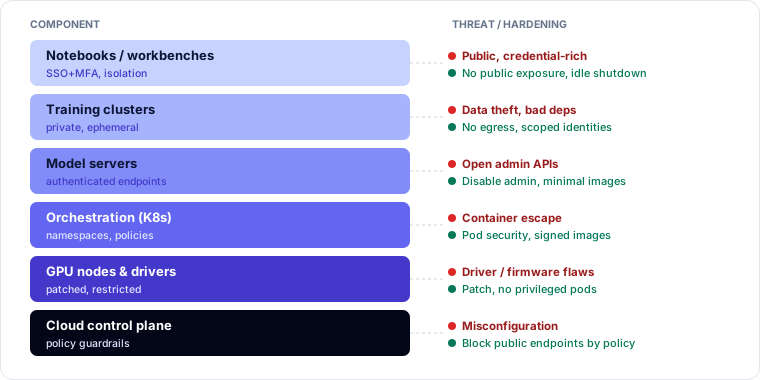
AI infrastructure has several layers, each with its own weaknesses [1][4]. Figure 4.6 summarizes the main threat and hardening for each component.
| Layer | Examples | Key hardening |
|---|---|---|
| ML tooling | Notebooks, experiment trackers, model registries, labeling tools | Authentication on every interface (many ship with none by default), no public exposure, idle shutdown, patching, secrets kept out of notebooks |
| Serving | Inference servers, model APIs, AI gateways | Authenticated endpoints, admin APIs disabled or isolated, minimal containers running as non-root, input size limits, generic error messages, TLS |
| Orchestration | Kubernetes, workflow engines, agent frameworks | Role-based access, network policies, admission control that only admits signed images, separate namespaces per workload |
| Compute | GPU nodes, accelerators, drivers | Patched drivers and firmware, restricted node access, memory hygiene between jobs |
| Network | Private endpoints, egress controls | Private connectivity to model providers; deny-by-default egress so a compromised workload cannot exfiltrate data or reach attacker servers |
ML tooling is where the opening case went wrong, and where real incidents most often start: data science tools are built for convenience, are often run by people outside central IT, and frequently hold both data and credentials.
The same principles apply in cloud, on-premises and hybrid deployments, but responsibility differs (section 2.5). In hybrid designs, pay special attention to the links between environments: an on-premises training cluster pulling cloud data, or a cloud-hosted model reading an on-premises knowledge base, creates paths that must be encrypted, authenticated and monitored.
Worked example: the notebook incident, layer by layer
| Layer | Failure | Control that would have prevented it |
|---|---|---|
| ML tooling | Notebook server with no authentication, publicly reachable | SSO-protected managed notebooks only; policy blocks self-started servers with public IPs |
| Secrets | Pipeline access key pasted into a notebook | Workload identity for the pipeline; secret scanning of notebooks; no long-lived keys (section 4.5) |
| Serving | Inference server admin API open on the network | Admin APIs disabled in production images; authenticated endpoints only |
| Network | Public IP on a GPU VM holding customer data | Private subnets for AI compute; CSPM alert on public IPs (section 3.4) |
| Lifecycle | "A few hours" became eight weeks | Idle shutdown and automatic expiry of experimental resources |
Response: treat the key as compromised (revoke and rotate; review access logs for the bucket), assume the data was exposed and assess notification duties, and preserve the VM for investigation (Module 5).
Isolation and sandboxing
Isolation limits the damage when something goes wrong. Choose its strength by two questions: how sensitive is the data, and how much do you trust the code? Figure 4.7 shows the ladder from weaker to stronger isolation.
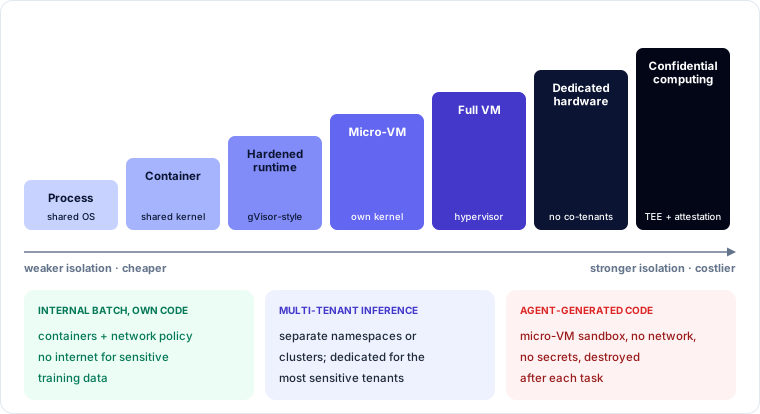
- Training jobs on sensitive data run in dedicated environments with no internet access, pulling only from approved internal sources.
- Inference for different customers or classification levels runs in separate tenants, namespaces or clusters; the most sensitive may need dedicated hardware.
- Agent-generated code is the least trusted code in the system: it was written by a model that may have been steered by an attacker. It needs the strongest practical isolation.
Sandboxing agent-generated code
Figure 4.8 shows a sandbox for an agent's code interpreter.
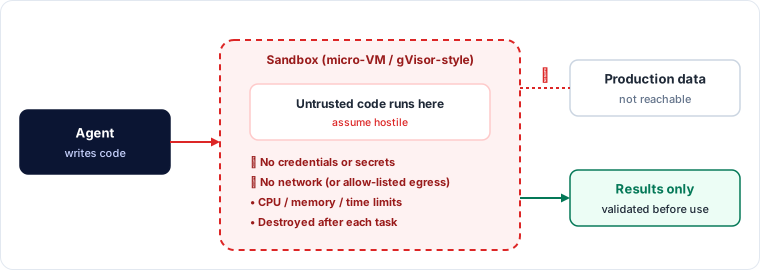
A sound sandbox has:
- a micro-VM or hardened container runtime, not a plain container sharing the host kernel;
- no network by default, or a strict egress allow-list if the task truly needs it;
- no credentials or secrets, and no route to internal services or production data;
- a read-only file system except a scratch area;
- strict CPU, memory and time limits;
- destruction after each task, so nothing persists between users or sessions;
- validation of results before they are used.
The pilot agent's interpreter in the opening case could reach the internet and the internal network. An injected instruction could have used it to download a tool, scan the internal network, or send data out.
Protecting against resource exhaustion
AI compute is expensive and finite, so exhaustion is both an availability and a financial risk (section 3.6). Layer the defenses:
- Rate limits on requests and token limits on inputs and outputs, per user, key and tenant.
- Compute quotas at the cluster level, so one team or tenant cannot consume all GPUs.
- Priorities, so production inference is served before batch jobs and experiments.
- Autoscaling with maximums: autoscaling keeps services available under load, but without a cap it converts an attack or a bug into an unlimited bill.
- Timeouts and caps on agent loops and tool calls.
Worked example: capping the weekend
| Control | Setting for the experimental namespace |
|---|---|
| GPU quota | 8 GPUs maximum |
| Autoscaler maximum | 8 nodes; scale-up beyond 4 requires an approval label |
| Agent loop cap | 25 steps or 10 minutes per task, then stop and log |
| Budget alert | Alert at USD 2,000 per day; hard stop at USD 5,000 |
| Priority | Experiments preempted by production inference |
With these settings, the stuck agent would have hit its loop cap within minutes, and even without it, the autoscaler could have added at most 8 GPUs, not 64.
Accelerator isolation
GPUs were designed for speed, not multi-tenant isolation. Controls include:
- Hardware partitioning: some GPUs can be split into isolated instances with their own memory and compute.
- Dedicated or reserved capacity for sensitive workloads.
- Memory hygiene: clearing GPU memory between jobs so one tenant's data or weights cannot be read by the next (the data remanence risk from section 1.1).
- Confidential GPU computing on supporting hardware, which keeps data protected in GPU memory and supports attestation (section 2.5).
Physical and environmental controls
High-density AI racks draw far more power and produce far more heat than ordinary servers, often needing liquid cooling. Facility controls must match:
- resilient power with enough capacity and backup;
- cooling designed and monitored for the density, since overheating causes outages;
- physical access control to AI halls, which hold very valuable hardware and model weights;
- fire detection and suppression suitable for the equipment and any liquid cooling systems.
With colocation or cloud providers, these controls are assessed through certifications and audit reports (section 2.5).
The opening case, resolved
- Tooling layer: an unauthenticated notebook server with a public IP. Use managed, SSO-protected notebooks, block public IPs on AI compute, and expire experimental resources automatically.
- Secrets: the pipeline key belonged in a workload identity, not a notebook. Revoke, rotate, review logs, and scan notebooks for secrets.
- Serving: disable or isolate admin APIs; authenticate all endpoints.
- Network: deny-by-default egress and private subnets.
- Autoscaler: quotas, maximums, loop caps and budget stops.
- Code interpreter: a micro-VM sandbox with no network, no secrets and no internal reach, destroyed after each task.
Check your understanding
Try each before reading the reasoning.
1. An inference cluster scales automatically to meet demand. An attacker sends a flood of long prompts. What is the risk if autoscaling has no maximum, and what controls apply?
Reasoning: availability is preserved but cost becomes unbounded. Cap autoscaling, set token-aware rate limits per identity, budget alerts and hard stops, and prioritize production traffic.
2. Which workload needs the strongest isolation: a nightly batch job scoring internal data with Meridian's own model, or an agent's code interpreter that runs code generated from user requests?
Reasoning: the code interpreter, because the code is untrusted (a model wrote it, possibly steered by an attacker). Use a micro-VM sandbox with no network, no secrets and destruction after each task.
3. Two customers' inference jobs share a GPU in sequence. What specific risk should be controlled?
Reasoning: data remanence in GPU memory: the second job may read the first job's data or weights. Clear memory between jobs, use hardware partitioning or dedicated capacity for sensitive workloads, or confidential GPU computing.
Key takeaways
- Harden every layer: ML tooling (authentication, no public exposure), serving (authenticated endpoints, no open admin APIs), orchestration (signed images, network policies), compute (patched drivers, memory hygiene) and network (deny-by-default egress).
- ML tooling is the most common starting point for AI incidents: convenient, often outside IT, rich in data and credentials.
- Choose isolation by data sensitivity and trust in the code. Agent-generated code is the least trusted and needs a sandbox with no network, no secrets and destruction after each task.
- Rate and token limits, quotas, priorities, timeouts and capped autoscaling stop exhaustion becoming an outage or an unlimited bill.
- Partition or dedicate GPUs and clear their memory between jobs. Match power, cooling, access and fire controls to high-density AI racks.