
Hardening AI infrastructure and platforms
In this lesson you will:
- Harden cloud, on-premises and hybrid AI deployments
- Isolate and sandbox training and inference workloads, including agent code execution
- Apply availability controls against resource exhaustion
- Plan isolated accelerator capacity and physical and environmental security
AI platforms combine familiar infrastructure — containers, Kubernetes, storage, networks — with unfamiliar elements: GPU drivers, model servers, notebooks, and agents that execute code. Each needs hardening.
1. Hardening across deployment models
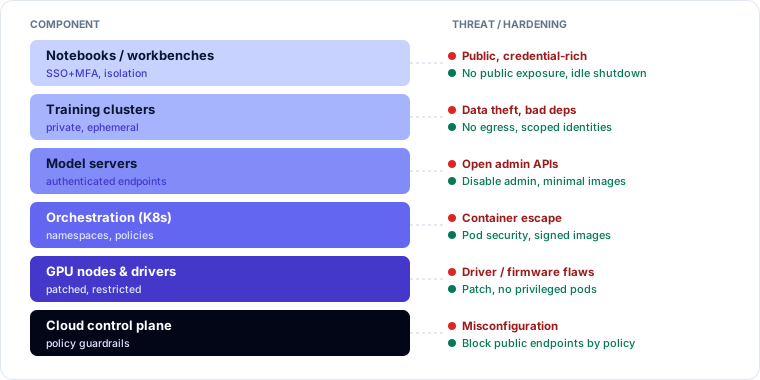
| Component | Hardening |
|---|---|
| Notebooks and workbenches | SSO with MFA; no public exposure; per-user isolation; no long-lived credentials; idle shutdown; egress control |
| Training clusters | Private networking; node images patched; scoped service identities; job-level isolation; encrypted storage |
| Model servers / inference | Minimal images; authenticated endpoints; disable debug and admin endpoints; resource limits; private endpoints |
| Kubernetes / orchestration | Namespaces per team or tenant; network policies; pod security standards; admission control for signed images |
| GPU nodes and drivers | Patch drivers and firmware; restrict device access; avoid privileged containers |
| Storage | Encryption, versioning, least-privilege buckets, no public access |
| Cloud control plane | Guardrail policies (no public endpoints, region restrictions), logging, configuration monitoring |
Hybrid deployments — for example, training in the cloud and inference on-premises or at the edge — add synchronisation channels and multiple control planes. Use consistent identity, logging and policy across both, and treat the link between them as a trust boundary.
Many AI tools were built for research convenience: open notebook servers, model servers with unauthenticated management APIs, permissive defaults. Assume defaults are insecure until reviewed.
2. Isolation and sandboxing
| Workload | Why isolate | How |
|---|---|---|
| Training | Handles sensitive data; runs third-party code and dependencies | Dedicated projects/accounts, private networks, no internet egress, ephemeral nodes |
| Inference | Internet-facing; processes untrusted input | Separate from training and data stores; network segmentation; per-tenant isolation |
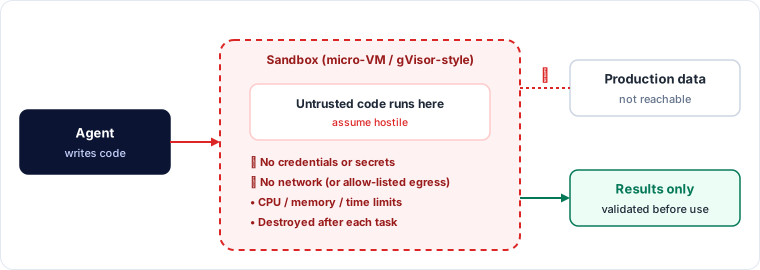
| Agent code execution | Agents may write and run code — potentially attacker-influenced | Sandbox: containers with gVisor-style kernels or micro-VMs, no credentials, no network or allow-listed egress, CPU/memory/time limits, destroyed after use |
| Untrusted models | Loading third-party artefacts | Scan and evaluate in a quarantine environment before registry admission |
3. Availability against resource exhaustion
AI workloads are expensive per request, so exhaustion attacks are cheap for attackers and costly for you.
- Rate limiting per user, key, tenant and IP.
- Compute throttling — cap GPU time per request; queue rather than overload.
- Input and output caps — maximum tokens, file size, image resolution.
- Agent limits — maximum iterations, tool calls, wall-clock time and spend per task.
- Budget alerts and hard caps — on cloud and provider accounts, to stop denial-of-wallet attacks.
- Autoscaling limits — scaling helps legitimate load but should have ceilings so an attack can't scale your bill without bound.
4. Isolated accelerator capacity
GPUs are scarce, so many organisations share them or rent them on demand.
- Dedicated capacity for sensitive or critical workloads — reserved instances, dedicated hosts or private clusters.
- Hardware partitioning — some GPUs support partitioning into isolated instances with separate memory; prefer it over time-slicing for multi-tenant use.
- Memory hygiene — ensure memory is cleared between jobs and tenants.
- Reservation for resilience — critical inference shouldn't compete with training jobs for the same capacity.
5. Physical and environmental security
High-density AI racks draw far more power and produce more heat than traditional servers; many need liquid cooling.
- Power — redundant feeds, UPS and generators sized for AI load.
- Cooling — redundancy and monitoring; cooling failure takes AI capacity offline quickly.
- Rack security — locked racks and cages, access logging, CCTV — GPUs and storage are high-value theft targets.
- Fire suppression — suitable for dense electrical loads and liquid-cooled equipment.
- Supply chain for hardware — trusted vendors, firmware verification, tamper-evident shipping.
For cloud AI, these sit with the provider — verify them through assurance reports.
Worked example — finding an exposed model server
An external attack-surface scan finds a model-serving management API reachable from the internet on a research team's cloud project.
| Finding | Risk | Fix |
|---|---|---|
| Management endpoint unauthenticated | Anyone can load, replace or delete models | Bind to private network; enable authentication; disable unused admin APIs |
| Container runs privileged with GPU device access | Escape to the node | Non-privileged pods with device plugin; pod security standards |
| No egress control | Compromised server could exfiltrate weights | Egress allow-list |
| Project outside central cloud policies | No guardrails applied | Move under the organisation's policy hierarchy; block public endpoints by policy |
🔐 Security lens
Add AI-specific services — notebook servers, model servers, vector databases, GPU nodes — to your external attack-surface monitoring. They are often stood up quickly by research teams outside normal hardening.
Key takeaways
- Harden notebooks, training clusters, model servers, orchestration, GPU nodes, storage and the cloud control plane; assume research-tool defaults are insecure.
- Isolate training, inference, untrusted models and especially agent code execution — sandboxes with no credentials, restricted network and resource limits.
- Defend availability with rate limits, compute throttling, caps, agent limits, budget caps and bounded autoscaling.
- Use dedicated or partitioned accelerators for sensitive work; plan power, cooling, rack security and fire suppression for AI density.
Self-check
- What restrictions should apply to a sandbox where an agent runs code it wrote?
- Why should autoscaling for an inference service have a ceiling?
- Why is cooling failure an availability risk specific to AI facilities?