
Model integrity and availability
In this lesson you will:
- Use signing, hashing and version control to protect model integrity
- Apply input and output sanitisation around models
- Plan model updates and rollback procedures
- Protect availability with rate limiting, quotas and graceful degradation
- Keep privacy-preserving audit trails for AI data events
Integrity means the model running in production is exactly the one that was approved and behaves as intended. Availability means it keeps serving — or fails gracefully — under load and attack.
1. Integrity controls
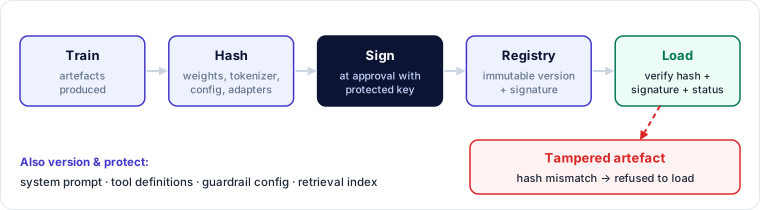
- Hashing — compute a cryptographic hash of every artefact (weights, tokenizer, config, adapters) and record it in the registry.
- Signing — sign approved artefacts with a protected key; production loaders verify the signature and the hash before loading. Keyless signing with transparency logs and build-provenance attestations are increasingly common.
- Version control — models, configs, prompts and evaluation sets are versioned; every production deployment references exact versions.
- Safe formats — load weights from formats that cannot execute code; scan anything else.
- Runtime integrity — read-only model volumes, immutable container images, file-integrity monitoring on serving hosts.
Integrity covers more than weights. For GenAI applications, the system prompt, tool definitions, guardrail configuration and retrieval index also determine behaviour — version and protect them the same way.
2. Input and output sanitisation
Models should never receive or emit unchecked data.
| Direction | Checks |
|---|---|
| Input | Type, size and format validation; encoding normalisation; malformed-file rejection; prompt-length limits; detection of known injection patterns; PII redaction where required |
| Output | Schema validation for structured output; content and safety filters; PII and secret detection; escaping before rendering in HTML or passing to shells, SQL or other interpreters |
The last point is critical: model output is untrusted input to whatever consumes it. Treating it as safe leads to cross-site scripting, SQL injection, command injection and server-side request forgery through the AI layer (OWASP's "improper output handling").
3. Updates and rollback
- Keep the previous approved version deployable at all times.
- Make rollback a tested, rehearsed procedure, not an improvisation — including rolling back prompts, guardrail configs and retrieval indexes, not only weights.
- Define rollback triggers: safety regression, drift beyond threshold, confirmed compromise, significant complaint spike.
- For hosted models you don't control, pin versions where the provider allows and test new versions before switching.
4. Availability controls
- Rate limiting — requests per second per user, tenant and API key.
- Quota enforcement — tokens or requests per day/month; separate quotas for agents.
- Input caps — maximum prompt size, file size and output tokens.
- Timeouts and iteration caps — for agents and long-running chains.
- Capacity isolation — keep critical workloads on reserved capacity so a noisy tenant can't starve them.
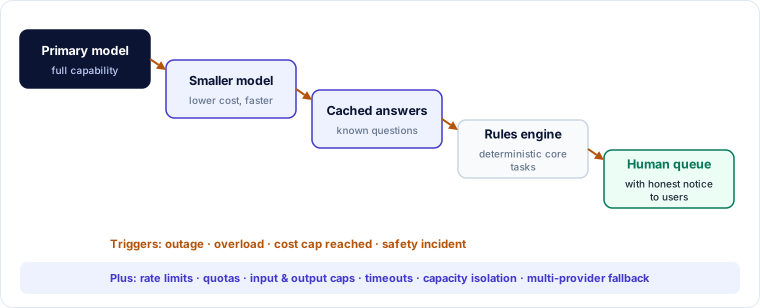
- Graceful degradation — fall back to a smaller model, cached answers, a rules engine or a human queue; tell users the service is limited.
- Multi-provider resilience — for critical services, a tested fallback provider or self-hosted model.
5. Privacy-preserving audit trails
Audit trails for AI data events — training-data access, model downloads, prompts and tool calls — are essential for investigations, but can themselves become a privacy risk.
- Log who, what, when, which version, which data — with prompt/output content stored separately, masked or tokenised, with restricted access.
- Use hash references to datasets and documents rather than copying content into logs.
- Apply retention limits and access logging to the audit logs themselves.
- Protect integrity: append-only storage, central collection, time synchronisation.
Worked example — output handling bug in an internal assistant
An internal analytics assistant generates SQL from questions and runs it, then renders the answer as HTML.
| Weakness | Exploit path | Fix |
|---|---|---|
| Generated SQL executed with the app's admin database role | Injected instruction in a shared dashboard note makes the assistant generate DROP TABLE |
Read-only role with row-level security; SQL parsed and allow-listed to SELECT on approved views |
| Model output rendered as raw HTML | Output containing a script tag runs in colleagues' browsers | Escape output; render Markdown with a sanitiser; strict CSP |
| No rollback for prompt templates | A prompt change broke safety instructions; no quick revert | Prompts versioned in the registry alongside the model; one-click rollback |
🔐 Security lens
"The model wrote it" is not a trust boundary. Apply the same validation to model output that you apply to user input before it reaches a browser, database, shell or another agent.
Key takeaways
- Hash, sign and version every artefact — weights, tokenizers, adapters, prompts, guardrail configs, indexes — and verify at load.
- Sanitise inputs and treat outputs as untrusted input to downstream systems.
- Keep the previous version deployable; rehearse rollback; pin hosted model versions.
- Protect availability with rate limits, quotas, caps, timeouts, capacity isolation and graceful degradation.
- Audit trails should capture events without becoming a new store of sensitive content.
Self-check
- Besides weights, which GenAI artefacts should be versioned and integrity-protected?
- Why must model output be escaped before it is rendered in a web page?
- Give two graceful-degradation options for a customer assistant.