
GenAI building blocks: tokens, embeddings, context and prompting
In this lesson you will:
- Explain the NLP pipeline from raw text to model output
- Describe tokens, token limits and token-based cost and abuse
- Explain embeddings, similarity search and vector databases
- Describe context windows and how prompts are assembled
- Apply prompt-engineering concepts and recognise their security limits
- Distinguish language, multimodal and other generative models
Almost every generative AI application — a chatbot, a copilot, a document assistant — is assembled from the same parts. If you understand these parts you can follow any architecture diagram and spot where untrusted data enters.
1. Generative, language and multimodal models
- Generative models produce new content rather than only classifying it.
- Large language models (LLMs) are decoder-style transformers trained to predict the next token. Through scale and alignment training they follow instructions, summarise, write code and reason over text.
- Small language models trade capability for cost, speed and the ability to run on-premises or on-device.
- Multimodal models accept and/or produce several modalities — text, images, audio, video — in one model.
- Foundation models are large pre-trained models that are adapted to many downstream tasks.
Security lens: multimodal input widens the injection surface. Instructions can be hidden in an image, in audio, or in a document's metadata, not just in typed text.
2. NLP building blocks
Natural language processing turns human language into something a model can compute over.
- Normalisation — cleaning text (case, Unicode normalisation).
- Tokenisation — splitting text into tokens.
- Embedding — mapping tokens to vectors.
- Modelling — the network processes the vectors.
- Decoding — turning output probabilities back into tokens and text.
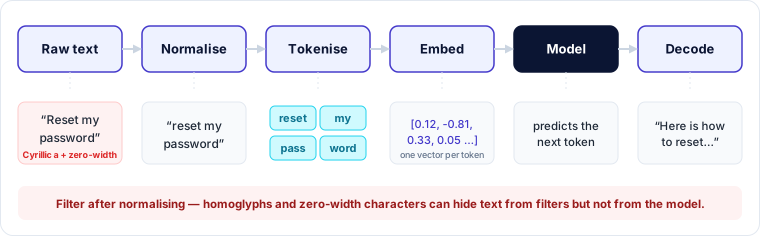
Classic NLP tasks you will see: named-entity recognition (useful for PII detection), sentiment analysis, classification, summarisation, translation and question answering.
Security lens: Unicode tricks — homoglyphs, zero-width characters, right-to-left overrides — can hide content from humans or filters while the model still reads it. Normalise before you filter.
3. Tokens and token management
A token is the unit a model reads and writes — often a word fragment. A rough rule for English is that one token is about three-quarters of a word, but this varies by language and tokenizer; many Indian and other non-Latin-script languages use more tokens per word.
Tokens matter because:
- Limits — every model has a maximum number of tokens it can process (input + output).
- Cost — hosted models usually bill per input and output token.
- Latency — more tokens means slower responses.
Token management practices:
- Set maximum output tokens per request.
- Apply per-user and per-application quotas and rate limits.
- Truncate or summarise long histories rather than sending everything.
- Monitor token accounting as a security signal — sudden spikes can indicate abuse, a runaway agent loop or data exfiltration.
Security lens: tokenizer behaviour can be exploited. Filters that match whole words may miss content that is split differently into tokens, and unusual token sequences ("glitch tokens") can trigger erratic behaviour.
Worked example — budgeting tokens and spotting abuse
An internal assistant serves 2,000 employees, each sending about 15 questions a day. Each request carries roughly 6,000 input tokens (about 5,000 of retrieved document chunks plus 1,000 of prompt and history).
- Per user: 15 × 6,000 = 90,000 tokens a day
- Whole organisation: 2,000 × 90,000 = 180 million tokens a day
One morning a single account has used 3 million tokens — about 33 times the normal per-user figure, or roughly 500 requests.
That pattern fits a script scraping the knowledge base through the assistant, or an agent stuck in a loop. Sensible controls: a per-user daily quota (for example 200,000 tokens), an alert at three times a user's normal baseline, and token usage fed into the SIEM alongside other identity signals.
4. Embeddings
An embedding is a dense numeric vector that represents meaning. Texts with similar meaning have vectors that are close together; closeness is usually measured with cosine similarity.
Uses: semantic search, retrieval for RAG, clustering, deduplication, recommendation and semantic DLP.
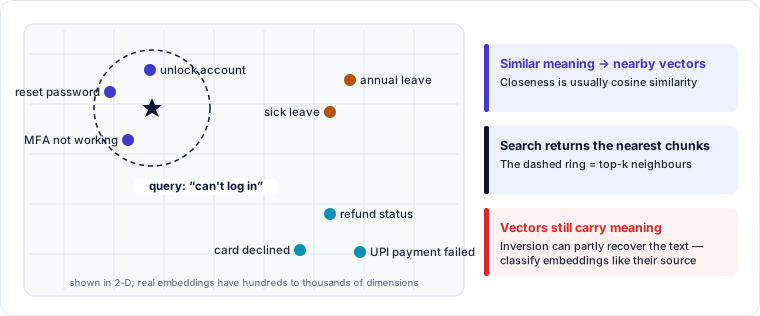
Security points:
- Embeddings are not anonymisation. Research has shown that original text can be partially reconstructed from embeddings (embedding inversion). Treat an embedding of sensitive data as sensitive data.
- Embedding models are part of the supply chain. A swapped or poisoned embedding model silently changes what gets retrieved.
5. Vector databases
A vector database stores embeddings and answers nearest-neighbour queries quickly, typically using approximate indexing. It usually stores the original text chunk and metadata (source, owner, classification) alongside each vector.
Security considerations:
- Access control at retrieval time. If every user's query searches every document, the assistant becomes a way to read documents the user could not open directly. Filter by the requesting user's permissions using metadata.
- Multi-tenancy. Separate namespaces or collections per tenant; never rely on the prompt to keep tenants apart.
- Integrity. Anyone who can write to the store can plant content that will be retrieved and treated as trusted context (RAG poisoning).
- Deletion. Honouring erasure requests means removing vectors and chunks, not just the source file.
- Standard hardening. Authentication, encryption at rest and in transit, backups and audit logging — vector stores are databases and need database security.
6. Context windows
The context window is everything the model can see in one call, measured in tokens: system prompt, conversation history, retrieved documents, tool results and the user's message. It is the model's working memory.
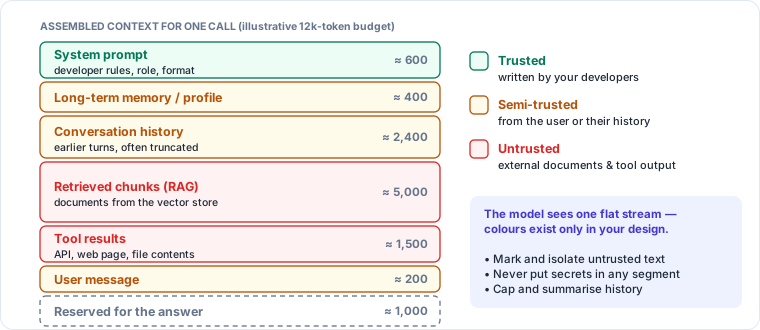
Important properties:
- The model has no persistent memory between calls unless the application re-sends history or stores memory externally.
- Larger windows allow more documents but increase cost and can dilute attention; content in the middle of a very long context can be used less reliably.
- Everything in the window is treated as input. The model has no hard boundary between developer instructions and untrusted content placed alongside them.
Context boundary validation — marking, separating and validating untrusted content before it enters the window — is a core guardrail you will study later.
7. Prompt engineering concepts
A prompt is the full input given to the model. Typical structure:
- System prompt — developer-defined role, rules and constraints.
- User prompt — the user's request.
- Context — retrieved data, tool outputs, history.
Techniques:
| Technique | Idea |
|---|---|
| Zero-shot | Ask directly with no examples |
| Few-shot | Include worked examples to show the pattern |
| Role / persona | Define who the model is acting as |
| Step-by-step reasoning | Ask the model to reason before answering |
| Structured output | Request JSON or a schema to make output machine-checkable |
| Delimiters | Wrap untrusted content in clear markers |
| Temperature / sampling | Lower temperature → more consistent output |
Security lens: prompt engineering improves behaviour but is not a security boundary. System prompts can be extracted, delimiters can be broken, and instructions can be overridden by injected text. Treat the system prompt as potentially public, never put secrets in it, and enforce real controls outside the model — authorisation, output validation and tool permissions.
8. How the parts fit together
A typical enterprise assistant request:
- User asks a question.
- The app embeds the question and queries the vector database.
- Retrieved chunks, the system prompt and history are assembled into the context window.
- The model generates a response, consuming tokens.
- Output is filtered and returned — or used to call a tool.
Untrusted data enters at steps 1, 2 (stored documents) and 5 (tool results). Each is an injection point.
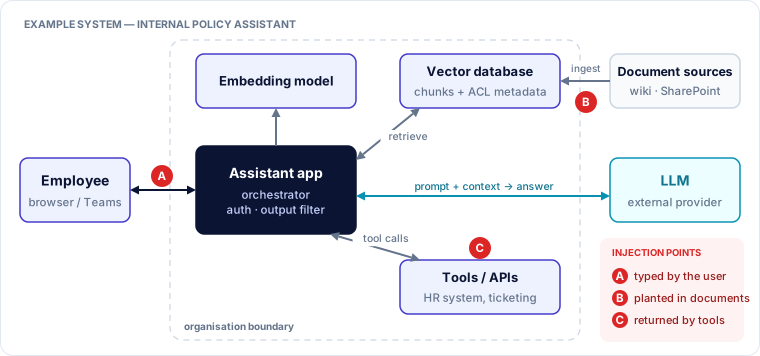
In this example, the assistant app is the only component that sees every flow. That makes it the right place to enforce authentication, permission-aware retrieval, output filtering and logging — rather than relying on instructions to the model.
🔐 Security lens
Draw the data flow and mark every point where text you do not control enters the context window. That map is the starting point for threat modelling any GenAI application.
Key takeaways
- Tokens drive limits, cost and latency; token monitoring is a security signal.
- Embeddings encode meaning and can leak it — they are not anonymised data.
- Vector databases need permission-aware retrieval, tenant isolation and write integrity.
- The context window mixes trusted instructions and untrusted data with no hard boundary.
- Prompt engineering shapes behaviour but never replaces enforced controls.
Self-check
- An HR chatbot answers questions from all HR documents for any employee. What control is missing?
- Why is storing embeddings of customer records still a privacy concern?
- Name three places untrusted text can enter a RAG assistant's context window.